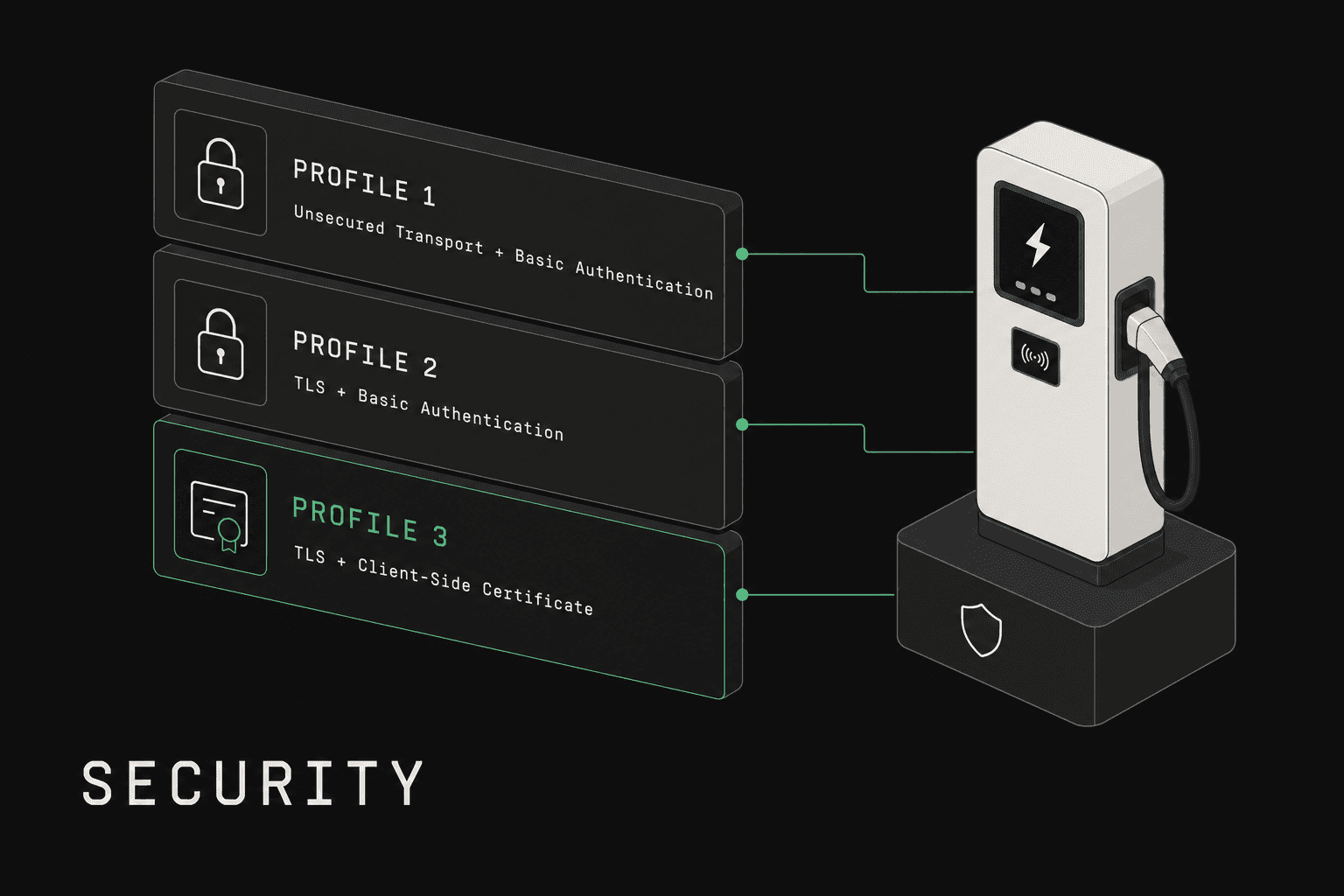
Quick answer: OCPP 2.0.1 defines three mandatory security profiles. Profile 1 is HTTP Basic Auth over unencrypted ws:// (only for isolated networks). Profile 2 is HTTP Basic Auth over TLS wss:// with server certificate validation — the practical minimum for production. Profile 3 is mutual TLS (mTLS) where both the charger and CPMS authenticate with X.509 certificates — the strongest option, recommended for public infrastructure. OCPP 1.6 supports the same profile model (numbered 0–3) as an opt-in extension via the Security Whitepaper edition 2.
Every EV charge point is a network-connected computer that processes payment data, controls high-voltage equipment, and communicates with backend systems over the public internet. A compromised charger is not a theoretical risk --- it is a physical safety hazard, a payment fraud vector, and a potential entry point into an operator's entire network. OCPP 2.0.1 introduced mandatory security profiles specifically because the previous generation of the protocol left security as an afterthought, and the industry paid for it.
This guide covers the three OCPP 2.0.1 security profiles in detail: what each one provides, how they work at the protocol level, when to use each, and how to implement and test them correctly.
Note on OCPP 1.6: A similar profile-based security model was retroactively added to OCPP 1.6 through the Security Whitepaper edition 2 (Profiles 0/1/2/3, plus certificate management, signed firmware, and
SecurityEventNotification). The whitepaper is opt-in per deployment, so most of the installed 1.6 base still runs without it. OCPP 2.0.1's contribution is making the model mandatory and unifying the numbering — not inventing the profile concept itself.
What Was the Security Problem in OCPP 1.6?
The original OCPP 1.6 core specification treated security as optional. It mentioned TLS but did not mandate it, define authentication mechanisms, or provide any certificate management framework. The Security Whitepaper edition 2 later filled most of those gaps for 1.6 as an opt-in extension, but it was published years after 1.6 itself and is not present in every deployed charger. In practice, the core-only posture led to widespread vulnerabilities across production charging networks.
What went wrong
Unencrypted WebSocket connections in production. Independent security researchers have repeatedly documented OCPP 1.6 deployments running over unencrypted ws:// rather than wss://. In 2021, Pen Test Partners disclosed vulnerabilities (Pen Test Partners, "Smart car chargers. Plug-n-play for hackers?", 2021) across six EV charger brands — including chargers with no authentication and predictable device IDs affecting millions of devices. When ws:// is used, every message --- including charger credentials, transaction data, and configuration commands --- travels in plaintext, and anyone on the same network segment can read and modify these messages.
No standardized authentication. OCPP 1.6 does not define how a CPMS should verify that an incoming WebSocket connection actually comes from a legitimate charge point. Many implementations rely solely on the charger's serial number in the URL path (/ocpp/CP001), which is trivially spoofable.
No firmware signing. When a CPMS pushes a firmware update to a charger over OCPP 1.6, there is no mechanism to verify the firmware's authenticity. An attacker who can intercept or modify the firmware URL can push arbitrary code to the charge point.
Man-in-the-middle exposure. Without TLS, an attacker positioned between the charger and the CPMS can intercept messages, inject fraudulent transaction data, modify charging profiles, or issue remote commands to the charger --- including stopping or starting sessions, changing power limits, or resetting the device.
Real-world risk scenarios
These are not hypothetical. Publicly documented incidents and security research have demonstrated:
- Session hijacking: Spoofing a charger identity to report phantom transactions or steal revenue from legitimate sessions.
- Free charging fraud: Manipulating transaction messages to avoid billing.
- Charger bricking: Pushing malicious firmware that renders charge points inoperable, requiring physical truck rolls to recover.
- Network lateral movement: Using a compromised charge point as a pivot to access the operator's internal systems, including payment processing and customer databases.
The Open Charge Alliance recognized these risks and made security a first-class concern in OCPP 2.0.1.
What Are the OCPP 2.0.1 Security Profiles?
OCPP 2.0.1 defines three security profiles that provide progressively stronger authentication and encryption. Every conformant implementation must support at least one profile, and the specification strongly recommends Profile 2 or 3 for any internet-facing deployment. The profile model is normative in the OCPP 2.0.1 specification published by the Open Charge Alliance, and the equivalent model for OCPP 1.6 lives in the OCPP 1.6 Security Whitepaper edition 2 (also from OCA).
| Profile 1 | Profile 2 | Profile 3 | |
|---|---|---|---|
| Authentication | HTTP Basic Auth | HTTP Basic Auth | Mutual TLS (client certificate) |
| Transport Encryption | None (ws://) |
TLS (wss://) |
TLS (wss://) |
| Server Identity Verification | None | Server certificate validated by charger | Server certificate validated by charger |
| Client Identity Verification | Password in HTTP header | Password in HTTP header | Client certificate validated by server |
| Certificate Management | Not applicable | Server certificate only | Server + client certificates |
| Protection Against MITM | None | Yes (server authenticated) | Yes (both sides authenticated) |
| Recommended Use Case | Isolated private networks | Standard production deployments | High-security and regulated environments |
The profile is configured on the charge point via the SecurityProfile variable in the Security component, and the CPMS must be configured to accept connections at the corresponding security level.
What Is Security Profile 1 (Basic Authentication)?
Security Profile 1 provides the minimum level of identity verification: the charge point authenticates itself to the CPMS using HTTP Basic Authentication transmitted during the WebSocket handshake. No TLS encryption is used.
How it works
- The charge point initiates a WebSocket connection to the CPMS at a
ws://endpoint. - The HTTP Upgrade request includes an
Authorizationheader containing the Base64-encodedchargePointId:passwordstring. - The CPMS decodes the credentials, validates them against its database, and either accepts the WebSocket upgrade or rejects it with HTTP 401.
- All subsequent OCPP messages travel over the unencrypted WebSocket connection.
Password management
The charger's authentication password is configured via the BasicAuthPassword variable. OCPP 2.0.1 specifies that passwords must be at least 16 characters and should be rotated periodically. The CPMS can trigger a password change by sending a SetVariables request to update the BasicAuthPassword, after which the charger reconnects with the new credentials.
When to use Profile 1
Profile 1 is appropriate only when:
- The charger and CPMS communicate over a physically isolated private network (e.g., a dedicated VPN or private APN on a cellular connection).
- No sensitive data traverses the connection, or the network itself provides encryption at a lower layer.
- Regulatory requirements do not mandate transport-layer encryption.
In every other scenario, Profile 1 is insufficient. The password travels in Base64 encoding (not encryption) and is visible to any network observer. Do not use Profile 1 over the public internet.
Risks
- All traffic is plaintext --- credentials, transaction data, and commands are fully exposed.
- Susceptible to credential theft via packet capture.
- No protection against man-in-the-middle attacks.
- An attacker who captures the password can impersonate the charger indefinitely until the password is rotated.
What Is Security Profile 2 (TLS with Server Certificate)?
Security Profile 2 adds TLS encryption to the Basic Authentication mechanism. The charger verifies the CPMS server's identity via its TLS certificate, and all communication is encrypted. This is the recommended minimum for any production deployment.
How it works
- The charge point initiates a TLS handshake with the CPMS at a
wss://endpoint. - The CPMS presents its server certificate. The charger validates the certificate against its trusted root certificate store (the
CACertificateStoreor a pre-provisioned root CA). - Once the TLS session is established, the charger sends the HTTP Upgrade request with the
Authorizationheader containing Basic Auth credentials, just as in Profile 1 --- but now encrypted within the TLS tunnel. - The CPMS validates the credentials and accepts or rejects the connection.
- All subsequent OCPP messages travel over the encrypted WebSocket connection.
TLS configuration requirements
OCPP 2.0.1 specifies concrete requirements for the TLS configuration:
Minimum TLS version: TLS 1.2 is the minimum. TLS 1.3 is recommended where both sides support it. TLS 1.0 and 1.1 are explicitly prohibited.
Cipher suites: The specification recommends cipher suites providing forward secrecy. Acceptable examples include:
TLS_ECDHE_RSA_WITH_AES_128_GCM_SHA256TLS_ECDHE_RSA_WITH_AES_256_GCM_SHA384TLS_ECDHE_ECDSA_WITH_AES_128_GCM_SHA256TLS_AES_128_GCM_SHA256(TLS 1.3)TLS_AES_256_GCM_SHA384(TLS 1.3)
Cipher suites without forward secrecy (e.g., RSA key exchange) or using CBC mode should be disabled.
Certificate requirements: The server certificate must be a valid X.509v3 certificate. The charger validates the certificate chain up to a trusted root CA. The certificate's Common Name (CN) or Subject Alternative Name (SAN) must match the CPMS hostname.
Certificate provisioning
For Profile 2, you need to provision the charger with the root CA certificate that signed the CPMS server certificate. This can be done:
- At manufacturing: Pre-load the charger with a set of trusted root CAs (similar to how browsers ship with trusted roots).
- During commissioning: Install the root CA certificate via a local interface or initial unencrypted connection, then switch to Profile 2.
- Via OCPP: Use the
InstallCertificatemessage to push the root CA certificate to the charger (though this requires an already-established connection).
When to use Profile 2
Profile 2 is appropriate for:
- Standard production deployments over the public internet.
- Environments where the CPMS identity must be verified but individual charger certificate management is operationally burdensome.
- Deployments where HTTP Basic Auth provides sufficient client authentication for the threat model.
Profile 2 protects against network eavesdropping and server impersonation. It does not protect against a stolen charger password being used from a different device --- the CPMS cannot distinguish between the real charger and an attacker using the same credentials from a different machine.
What Is Security Profile 3 (Mutual TLS)?
Security Profile 3 is the gold standard. Both the charger and the CPMS authenticate each other using X.509 certificates. No passwords are involved --- identity is proven cryptographically.
How it works
- The charge point initiates a TLS handshake with the CPMS at a
wss://endpoint. - The CPMS presents its server certificate. The charger validates it against its trusted root CA store.
- The CPMS requests the client certificate. The charger presents its own X.509 certificate.
- The CPMS validates the charger's certificate against its trusted root CA store. If the certificate is valid and not revoked, the TLS handshake completes.
- The WebSocket upgrade proceeds without an
Authorizationheader --- the TLS client certificate has already authenticated the charger. - All communication is encrypted and both endpoints are cryptographically verified.
Why mTLS is stronger
With Profile 2, a stolen password can be used from any device. With Profile 3, the charger's private key never leaves the device. Even if an attacker captures network traffic, they cannot extract the private key from the TLS handshake. To impersonate a charger, an attacker would need physical access to extract the private key from the device's secure storage --- a significantly higher barrier.
mTLS also eliminates the operational burden of password management. There are no passwords to rotate, no risk of weak passwords, and no credentials transmitted in HTTP headers.
PKI requirements
Profile 3 requires a functioning Public Key Infrastructure (PKI):
Certificate Authority (CA): You need a CA to issue certificates to both the CPMS and individual charge points. This can be:
- A private CA operated by the CPO or CPMS vendor (most common for charge point certificates).
- A public CA like Let's Encrypt or DigiCert for the CPMS server certificate.
- A managed PKI service from a cloud provider (AWS Private CA, Azure Key Vault, Google Cloud CA Service).
Certificate lifecycle: Each charge point needs its own unique certificate. This means provisioning certificates at manufacturing or commissioning, rotating them before expiry, and revoking them if a device is decommissioned or compromised.
Secure key storage: The charger must store its private key in a secure element or trusted platform module (TPM) to prevent extraction. The specification recommends hardware-backed key storage.
When to use Profile 3
Profile 3 is appropriate for:
- High-security deployments in regulated industries (government facilities, military installations, critical infrastructure).
- Networks where charger impersonation is a material threat.
- Operators who have the infrastructure to manage a PKI and certificate lifecycle.
- Deployments that require compliance with standards like ISO 15118 Plug & Charge, which also relies on certificate-based authentication.
The primary barrier to Profile 3 adoption is operational complexity. Managing certificates for thousands of charge points requires automation, monitoring for approaching expiry dates, and a revocation strategy. For many operators, Profile 2 provides sufficient security with significantly less operational overhead.
How Does Certificate Management Work in OCPP 2.0.1?
OCPP 2.0.1 includes dedicated messages for managing certificates on charge points over the OCPP connection itself. This is critical for Profile 2 and Profile 3 deployments where certificates need to be updated remotely.
InstallCertificate
The CPMS sends InstallCertificate to push a new certificate to the charge point. The message specifies the certificate type:
CentralSystemRootCertificate--- Root CA used to validate the CPMS server certificate.ManufacturerRootCertificate--- Root CA used to validate firmware signing certificates.V2GRootCertificate--- Root CA for ISO 15118 Vehicle-to-Grid communication.
The charger validates the certificate format and stores it. If storage is full or the certificate is malformed, the charger responds with Rejected.
GetInstalledCertificateIds
The CPMS sends GetInstalledCertificateIds to query which certificates are currently installed on the charger. The response includes the certificate hash (issuer name hash, issuer key hash, serial number) for each installed certificate. This allows the CPMS to audit a charger's certificate store and determine if updates are needed.
DeleteCertificate
The CPMS sends DeleteCertificate to remove a specific certificate from the charge point, identified by its certificate hash data. This is used to revoke trust in a compromised CA or remove expired certificates.
CertificateSigningRequest
For Profile 3, when a charger needs a new client certificate (initial provisioning or renewal), it generates a key pair locally and sends a SignCertificate request containing the CSR (Certificate Signing Request). The CPMS forwards the CSR to the CA, obtains the signed certificate, and delivers it back to the charger via CertificateSigned. This ensures the private key is generated on the charger and never transmitted.
Certificate rotation workflow
A typical certificate renewal for Profile 3 follows this sequence:
- The CPMS monitors certificate expiry dates (queried via
GetInstalledCertificateIds). - Before expiry, the CPMS triggers the charger to generate a new CSR via
TriggerMessagewithSignCertificate. - The charger generates a new key pair and sends
SignCertificatewith the CSR. - The CPMS submits the CSR to the CA and receives the signed certificate.
- The CPMS sends
CertificateSignedwith the new certificate. - The charger installs the new certificate and begins using it on the next TLS handshake.
This entire workflow happens over the existing OCPP connection without physical access to the charger.
How Do Signed Firmware Updates Work?
OCPP 2.0.1 addresses the firmware tampering risk from OCPP 1.6 with cryptographic signature verification for firmware updates.
How signed firmware works
- The CPMS sends a
SignedUpdateFirmwarerequest containing the firmware download URL, the expected signing certificate, and the firmware signature. - The charger downloads the firmware from the specified URL.
- Before installing, the charger verifies the firmware signature against the signing certificate. The signing certificate itself is validated against the
ManufacturerRootCertificateinstalled on the charger. - If the signature is valid, the charger installs the firmware and reports
InstalledviaFirmwareStatusNotification. - If verification fails, the charger rejects the update and reports
InvalidSignature.
Secure boot chain
Signed firmware is most effective when combined with secure boot:
- Hardware root of trust: The bootloader is stored in read-only memory and cannot be modified.
- Chain of trust: The bootloader verifies the OS image signature before loading it. The OS verifies application firmware signatures before executing.
- Runtime integrity: The charge point periodically verifies its own firmware integrity and reports anomalies.
Together, signed firmware and secure boot ensure that only authorized code runs on the charge point, from power-on through normal operation.
Implementation Recommendations
Choosing the right profile
Start with Profile 2 for most deployments. It provides encrypted communication and server authentication with manageable operational complexity. The majority of production OCPP 2.0.1 networks run Profile 2.
Use Profile 3 when:
- Your threat model specifically includes charger impersonation.
- Regulatory requirements mandate mutual authentication.
- You are deploying ISO 15118 Plug & Charge (which requires its own certificate infrastructure, making the incremental cost of mTLS lower).
- You have or can build the PKI infrastructure to manage per-device certificates.
Avoid Profile 1 for internet-facing deployments. If you must use it, ensure the network provides encryption at a lower layer (IPsec VPN, private APN with encryption).
TLS setup checklist
For Profile 2 and 3 deployments:
- Obtain a server certificate from a public CA for your CPMS endpoint. Use a SAN that matches your WebSocket URL hostname.
- Configure TLS 1.2 minimum on your CPMS. Disable TLS 1.0, 1.1, and all weak cipher suites.
- Enable forward secrecy by prioritizing ECDHE cipher suites.
- Provision chargers with the root CA certificate that signs your server certificate. For public CAs, most charger firmware includes standard root stores.
- Implement OCSP stapling or CRL checking on the CPMS to enable certificate revocation validation.
- Monitor certificate expiry and automate renewal. A single expired certificate can take down connectivity for your entire fleet.
Certificate authority options
| Approach | Pros | Cons | Best for |
|---|---|---|---|
| Public CA (Let's Encrypt, DigiCert) | Trusted by default, automated renewal (ACME), no infrastructure to run | Cannot issue client certificates for charge points (typically), cost per certificate at scale | CPMS server certificates |
| Private CA (self-hosted, e.g., step-ca, EJBCA) | Full control, no per-certificate cost, can issue client certificates | Requires operational expertise, must distribute root CA to all chargers | Charge point client certificates for Profile 3 |
| Managed PKI (AWS Private CA, Azure Key Vault) | Managed infrastructure, API-driven, audit logging | Per-certificate cost, cloud vendor dependency | Organizations without PKI expertise |
For most operators, a hybrid approach works well: public CA for the CPMS server certificate (Profile 2) and private or managed CA for charge point client certificates (Profile 3).
How to Test OCPP Security Profiles
Security configuration is one of the most common sources of interoperability issues in OCPP deployments. A charger that works perfectly on an unencrypted connection may fail silently when TLS is enabled due to certificate chain issues, cipher suite mismatches, or incorrect hostname validation.
What to test
Profile 1 testing:
- Verify the charger sends correct Basic Auth credentials in the WebSocket upgrade request.
- Test with incorrect passwords --- the CPMS should reject with HTTP 401.
- Confirm password rotation works: update
BasicAuthPasswordviaSetVariables, verify the charger reconnects with the new password.
Profile 2 testing:
- Verify TLS handshake completes successfully with a valid server certificate.
- Test with an expired server certificate --- the charger should refuse to connect.
- Test with a self-signed certificate not in the charger's trust store --- connection should fail.
- Verify cipher suite negotiation uses forward-secrecy suites.
- Test
InstallCertificatefor updating the root CA on the charger. - Confirm the charger validates the server certificate's hostname against the connection URL.
Profile 3 testing:
- Verify mutual TLS handshake with valid client and server certificates.
- Test with a revoked client certificate --- the CPMS should reject the connection.
- Test the full
SignCertificate/CertificateSignedworkflow for certificate provisioning. - Verify certificate rotation without connection downtime.
- Test
GetInstalledCertificateIdsto audit the charger's certificate store. - Confirm
DeleteCertificatecorrectly removes certificates and the charger stops trusting the deleted CA.
Firmware signing testing:
- Send a
SignedUpdateFirmwarewith a valid signature --- firmware should install. - Send a
SignedUpdateFirmwarewith a tampered signature --- charger should reject withInvalidSignature. - Test with an expired signing certificate.
Testing with OCPPLab
OCPPLab provides an OCPP emulator that supports all three security profiles, allowing you to test your CPMS or charge point firmware against each profile configuration without deploying physical hardware. You can simulate TLS connections, certificate exchanges, and the full certificate lifecycle management workflow, catching configuration issues before they reach production.
For a broader overview of OCPP testing strategies and tools, see our OCPP testing guide.
Frequently Asked Questions
Is OCPP 2.0.1 security mandatory?
Yes. Every OCPP 2.0.1 implementation must support at least one security profile. The specification does not allow unprotected connections without a declared profile. However, the choice of which profile to implement is left to the deployer. In practice, conformance testing programs from the OCA verify security profile support.
Can I upgrade from Profile 1 to Profile 2 or 3 remotely?
Yes, but with caveats. You can push a root CA certificate via InstallCertificate over an existing Profile 1 connection, then change the SecurityProfile variable to 2 via SetVariables. The charger will reconnect using TLS. Upgrading to Profile 3 requires provisioning a client certificate, which involves the SignCertificate workflow. The initial Profile 1 connection is unencrypted, so this upgrade path should ideally happen on a trusted network during commissioning.
What happens if a charger's certificate expires?
If a Profile 3 charger's client certificate expires, the CPMS will reject the TLS handshake and the charger will be unable to connect. This is why proactive certificate monitoring and renewal is critical. Most implementations trigger renewal 30-60 days before expiry. If a certificate does expire, the charger typically requires a local intervention (physical access or local API) to install a new certificate or temporarily downgrade to Profile 2 with Basic Auth to re-establish connectivity.
Do I need a separate PKI for OCPP and ISO 15118?
They are technically separate trust chains. The OCPP PKI handles charger-to-CPMS authentication. The ISO 15118 PKI (V2G PKI) handles vehicle-to-charger authentication for Plug & Charge. However, some operators share infrastructure components (the same CA software, HSMs, and monitoring tools) between the two PKIs to reduce operational costs. The root certificates are distinct and installed via different certificate types in InstallCertificate.
How does OCPP security relate to PCI DSS compliance?
OCPP security profiles help meet PCI DSS requirements for encrypting cardholder data in transit, but they are not sufficient on their own. PCI DSS covers the entire payment processing chain, including data storage, access controls, and network segmentation. Profile 2 or 3 addresses the transport encryption requirement between the charger and CPMS. Additional measures are needed for end-to-end payment security.
Can I use Let's Encrypt certificates for my CPMS?
Yes, and many operators do. Let's Encrypt certificates are trusted by most charger firmware out of the box (since chargers typically ship with standard root CA stores). The 90-day validity requires automated renewal via ACME, which is straightforward for server-side certificates. Let's Encrypt does not issue client certificates, so you will need a separate CA for Profile 3 charge point certificates.
Further Reading
- What is OCPP? The Complete Guide --- Foundational overview of the protocol, message types, and architecture.
- OCPP 1.6 vs 2.0.1: Complete Comparison --- Detailed comparison including security, smart charging, and migration guidance.
- OCPP WebSocket Guide --- Deep dive into WebSocket connection management, TLS configuration, and reconnection strategies.
- OCPP Testing Guide --- Comprehensive guide to testing OCPP implementations, including security profile validation.