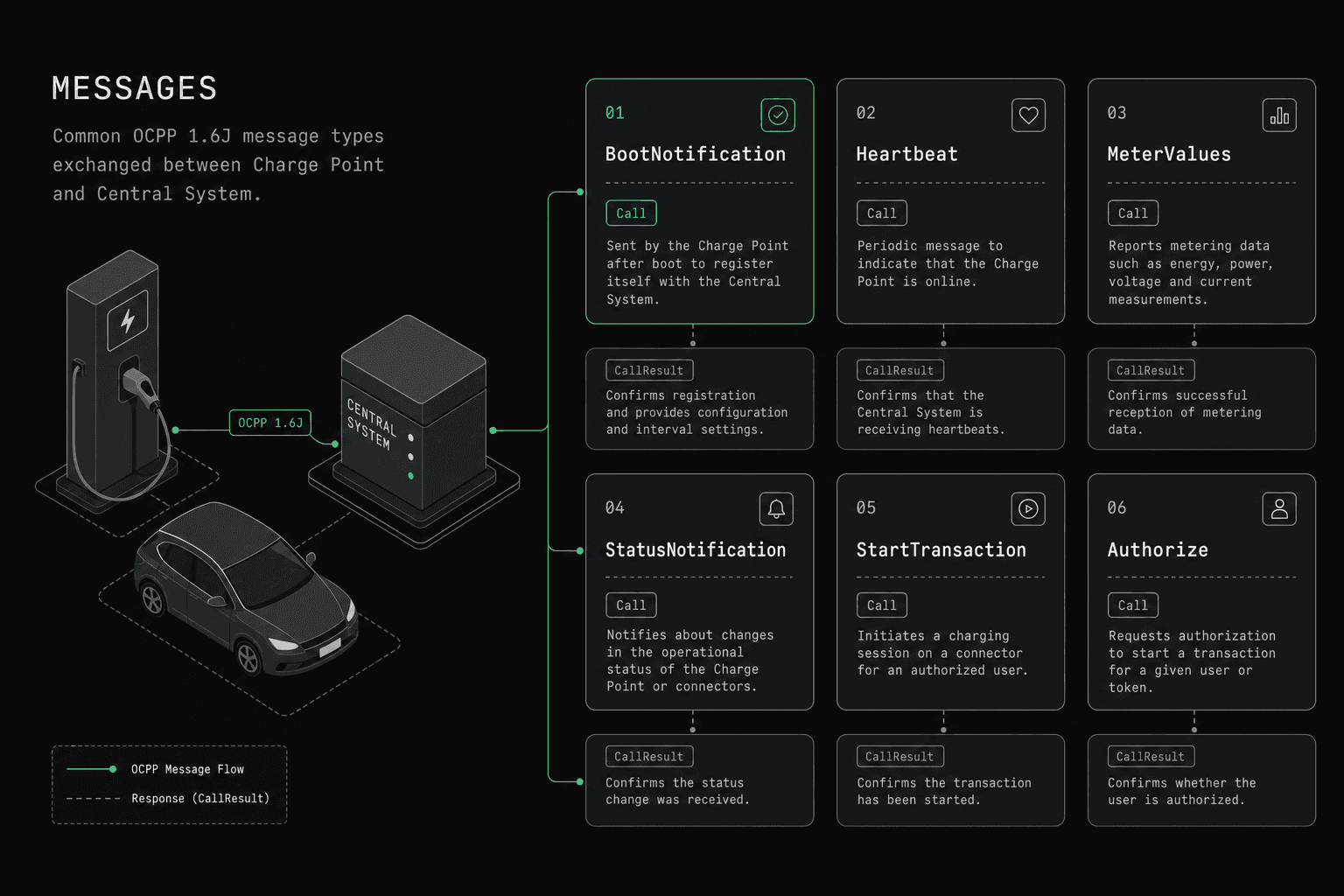
Quick answer: OCPP message types are the named actions a charge point and CSMS exchange over WebSocket in a strict request-response pattern. Every request is a CALL; responses are a CALLRESULT or CALLERROR. OCPP 1.6 defines 28 core actions (plus 11 in the Security Whitepaper). OCPP 2.0.1 Edition 2 defines 64 operations and unifies transactions under TransactionEvent.
OCPP message types define every interaction between a charge point and a CSMS (Charging Station Management System; OCPP 1.6: Central System). Each message type corresponds to a specific operation: authorizing a user, starting a transaction, reporting meter data, updating firmware, or configuring smart charging profiles. The Open Charge Point Protocol, maintained by the Open Charge Alliance, specifies exactly which party initiates each message, what fields are required, and what response is expected.
OCPP communication follows a strict request-response pattern over WebSocket. Every request is a CALL message containing an action name and payload. The receiver responds with either a CALLRESULT (success) or a CALLERROR (failure). There are no unsolicited responses, no partial acknowledgments, and no message queuing within the protocol itself. Understanding the full catalog of message types is the foundation for building any OCPP-compliant system.
This reference covers every message type in OCPP 1.6 and 2.0.1, organized by direction and protocol version.
If you want version-specific execution guidance beyond the message catalog, see OCPP 1.6 testing and OCPP 2.0.1 testing.
How Is an OCPP Message Formatted?
All OCPP messages are JSON arrays transmitted over WebSocket. There are three message types, each identified by a MessageTypeId integer.
CALL (Request) — MessageTypeId 2
[2, "uniqueId-123", "BootNotification", {
  "chargePointVendor": "OCPPLab",
  "chargePointModel": "Emulator-v1"
}]| Position | Field | Type | Description |
|---|---|---|---|
| 0 | MessageTypeId |
Integer | Always 2 for CALL |
| 1 | UniqueId |
String | Unique identifier for this request (max 36 chars) |
| 2 | Action |
String | The message type name (e.g., BootNotification) |
| 3 | Payload |
Object | JSON object containing the message fields |
CALLRESULT (Success Response) — MessageTypeId 3
[3, "uniqueId-123", {
  "currentTime": "2025-03-20T10:00:00.000Z",
  "interval": 300,
  "status": "Accepted"
}]| Position | Field | Type | Description |
|---|---|---|---|
| 0 | MessageTypeId |
Integer | Always 3 for CALLRESULT |
| 1 | UniqueId |
String | Must match the UniqueId of the original CALL |
| 2 | Payload |
Object | Response data specific to the action |
CALLERROR (Error Response) — MessageTypeId 4
[4, "uniqueId-123", "InternalError",
  "Database connection timeout",
{"retryAfter": 30}]| Position | Field | Type | Description |
|---|---|---|---|
| 0 | MessageTypeId |
Integer | Always 4 for CALLERROR |
| 1 | UniqueId |
String | Must match the UniqueId of the original CALL |
| 2 | ErrorCode |
String | Standardized OCPP error code |
| 3 | ErrorDescription |
String | Human-readable explanation (max 255 chars) |
| 4 | ErrorDetails |
Object | Optional additional context |
The UniqueId ties every response to its request. A charge point or CPMS must never send a CALLRESULT or CALLERROR without a matching pending CALL. If a response is not received within the configured timeout, the sender should treat the request as failed.
Which OCPP 1.6 Messages Are Charger-Initiated?
These messages are sent from the charge point to the CPMS. The charge point creates the CALL; the CPMS responds with CALLRESULT or CALLERROR.
| Message Name | Purpose | Key Fields | When Sent |
|---|---|---|---|
| Authorize | Validate an ID tag before or during charging | idTag |
User presents RFID card or app credential |
| BootNotification | Register the charger and receive configuration | chargePointVendor, chargePointModel, chargePointSerialNumber |
On startup, after reset, or after reconnection |
| DataTransfer | Send vendor-specific data outside the standard spec | vendorId, messageId, data |
Anytime — used for custom extensions |
| DiagnosticsStatusNotification | Report diagnostic upload progress | status (Idle, Uploaded, UploadFailed, Uploading) |
After CPMS requests diagnostics via GetDiagnostics |
| FirmwareStatusNotification | Report firmware update progress | status (Downloaded, DownloadFailed, Downloading, Idle, InstallationFailed, Installing, Installed) |
During firmware update lifecycle |
| Heartbeat | Confirm the charger is still connected | (empty payload) | At the interval specified in BootNotification response |
| MeterValues | Report energy measurements and power readings | connectorId, meterValue[] (timestamp, sampledValue[]) |
Periodically during charging, or clock-aligned |
| StartTransaction | Notify CPMS that a charging session has begun | connectorId, idTag, meterStart, timestamp |
When energy transfer starts |
| StatusNotification | Report the current status of a connector | connectorId, errorCode, status |
On status change (Available, Charging, Faulted, etc.) |
| StopTransaction | Notify CPMS that a charging session has ended | transactionId, meterStop, timestamp, reason |
When energy transfer stops |
Every charger-initiated message expects a .conf response from the CPMS. For example, BootNotification expects a BootNotification.conf containing status, currentTime, and interval. If the CPMS responds with status: Rejected, the charger must retry at the interval specified and must not accept charging sessions until accepted.
Which OCPP 1.6 Messages Are CPMS-Initiated?
These messages are sent from the CPMS to the charge point. The CPMS creates the CALL; the charge point responds.
| Message Name | Purpose | Key Fields | When Sent |
|---|---|---|---|
| CancelReservation | Cancel a previously made reservation | reservationId |
When a user cancels or reservation policy requires it |
| ChangeAvailability | Set a connector or charger to operative/inoperative | connectorId, type (Operative, Inoperative) |
For maintenance, scheduling, or load management |
| ChangeConfiguration | Update a configuration key on the charger | key, value |
To adjust settings like heartbeat interval or meter sampling |
| ClearCache | Clear the charger's local authorization cache | (empty payload) | When authorization data has changed centrally |
| ClearChargingProfile | Remove one or more charging profiles | id, connectorId, chargingProfilePurpose, stackLevel |
When smart charging profiles need to be cleared |
| DataTransfer | Send vendor-specific data to the charger | vendorId, messageId, data |
For custom vendor extensions |
| GetCompositeSchedule | Retrieve the effective composite charging schedule from all active profiles | connectorId, duration, chargingRateUnit |
For verifying the actual schedule a connector will follow |
| GetConfiguration | Retrieve current configuration values | key[] (optional — omit to get all) |
For diagnostics or auditing charger settings |
| GetDiagnostics | Request the charger to upload diagnostic logs | location (URI), startTime, stopTime, retries |
When debugging charger issues remotely |
| GetLocalListVersion | Check the version of the local authorization list | (empty payload) | Before sending an updated local list |
| RemoteStartTransaction | Remotely start a charging session | idTag, connectorId (optional), chargingProfile (optional) |
When user starts charging via mobile app or CPMS portal |
| RemoteStopTransaction | Remotely stop a charging session | transactionId |
When user or operator stops charging remotely |
| ReserveNow | Reserve a connector for a specific user | connectorId, expiryDate, idTag, reservationId |
When a user reserves a charger in advance |
| Reset | Reboot the charger | type (Hard, Soft) |
For recovery, updates, or maintenance |
| SendLocalList | Send or update the local authorization list | listVersion, localAuthorizationList[], updateType |
To enable offline authorization |
| SetChargingProfile | Install a charging profile for smart charging | connectorId, csChargingProfiles |
For load balancing, demand response, or scheduled charging |
| TriggerMessage | Request the charger to send a specific message immediately | requestedMessage (e.g., BootNotification, MeterValues) |
When CPMS needs a status update on demand |
| UnlockConnector | Remotely unlock a connector | connectorId |
When a cable is stuck or user requests remote unlock |
| UpdateFirmware | Instruct charger to download and install new firmware | location (URI), retrieveDate, retries, retryInterval |
For firmware rollouts |
All 19 CPMS-initiated messages follow the same CALL/CALLRESULT pattern. The charge point must implement handlers for every message it claims to support in its feature profile.
What Messages Are New in OCPP 2.0.1?
OCPP 2.0.1 introduces a significantly expanded message set organized into functional blocks, as documented in the OCPP 2.0.1 specification from the Open Charge Alliance. Many OCPP 1.6 messages were renamed, split, or consolidated. The following table lists messages that are new in 2.0.1 or substantially changed from 1.6.
New Charger-Initiated Messages (2.0.1)
| Message Name | Purpose | Functional Block |
|---|---|---|
| Authorize | Extended with certificate-based auth, ISO 15118 support | Authorization |
| ClearedChargingLimit | Notify CPMS that an external charging limit was cleared | SmartCharging |
| FirmwareStatusNotification | Extended with requestId for tracking |
FirmwareManagement |
| Get15118EVCertificate | Request an ISO 15118 certificate for the EV | ISO15118CertificateManagement |
| LogStatusNotification | Report log upload status (replaces DiagnosticsStatusNotification) | Diagnostics |
| MeterValues | Restructured with evse instead of connectorId |
MeterValues |
| NotifyChargingLimit | Report external charging limits (e.g., from grid operator) | SmartCharging |
| NotifyCustomerInformation | Return customer information requested by CPMS | CustomerInformation |
| NotifyDisplayMessages | Return display messages currently stored | DisplayMessage |
| NotifyEVChargingNeeds | Report the EV's charging requirements (ISO 15118) | SmartCharging |
| NotifyEVChargingSchedule | Report the current EV charging schedule | SmartCharging |
| NotifyEvent | Report events and monitoring results | DeviceModel |
| NotifyMonitoringReport | Return monitoring configuration data | DeviceModel |
| NotifyReport | Return device model report data | DeviceModel |
| PublishFirmwareStatusNotification | Report publish firmware status for local controller | FirmwareManagement |
| ReportChargingProfiles | Return installed charging profiles | SmartCharging |
| ReservationStatusUpdate | Report reservation status changes | Reservation |
| SecurityEventNotification | Report security-related events | Security |
| SignCertificate | Request CPMS to sign a certificate | Security |
| TransactionEvent | Unified transaction lifecycle reporting (replaces StartTransaction, StopTransaction, MeterValues during transaction) | Transactions |
New CPMS-Initiated Messages (2.0.1)
| Message Name | Purpose | Functional Block |
|---|---|---|
| CertificateSigned | Send a signed certificate to the charger | Security |
| ClearDisplayMessage | Remove a message from the charger display | DisplayMessage |
| ClearVariableMonitoring | Remove monitoring settings | DeviceModel |
| CostUpdated | Update the running cost of a transaction | TariffAndCost |
| CustomerInformation | Request customer data stored on charger | CustomerInformation |
| DeleteCertificate | Remove an installed certificate | Security |
| GetBaseReport | Request a full device model report | DeviceModel |
| GetChargingProfiles | Request installed charging profiles | SmartCharging |
| GetDisplayMessages | Request current display messages | DisplayMessage |
| GetInstalledCertificateIds | List installed certificates | Security |
| GetLog | Request log upload (replaces GetDiagnostics) | Diagnostics |
| GetMonitoringReport | Request monitoring configuration | DeviceModel |
| GetReport | Request specific device model variables | DeviceModel |
| GetTransactionStatus | Check if a transaction is still ongoing | Transactions |
| GetVariables | Read device model variables | DeviceModel |
| InstallCertificate | Install a certificate on the charger | Security |
| PublishFirmware | Instruct local controller to publish firmware | FirmwareManagement |
| RequestStartTransaction | Start a transaction (replaces RemoteStartTransaction) | Transactions |
| RequestStopTransaction | Stop a transaction (replaces RemoteStopTransaction) | Transactions |
| SetDisplayMessage | Configure a message on the charger display | DisplayMessage |
| SetMonitoringBase | Configure monitoring base settings | DeviceModel |
| SetMonitoringLevel | Set the severity level for monitoring | DeviceModel |
| SetNetworkProfile | Configure network connection settings | Provisioning |
| SetVariableMonitoring | Configure monitoring on device variables | DeviceModel |
| SetVariables | Write device model variables | DeviceModel |
| UnpublishFirmware | Remove published firmware from local controller | FirmwareManagement |
The most significant architectural change in 2.0.1 is the introduction of TransactionEvent, which consolidates StartTransaction, StopTransaction, and in-transaction MeterValues into a single message with an eventType field (Started, Updated, Ended). This simplifies transaction tracking and eliminates race conditions common in 1.6 implementations.
Key Messages Deep Dive
The following sections provide detailed request/response examples for the six most commonly implemented and debugged OCPP messages.
BootNotification
BootNotification is the first meaningful message a charger sends after establishing a WebSocket connection. It registers the charger with the CPMS and receives time synchronization and heartbeat configuration.
OCPP 1.6 Request:
[2, "boot-001", "BootNotification", {
  "chargePointVendor": "OCPPLab",
  "chargePointModel": "Emulator-Pro",
  "chargePointSerialNumber": "OCPPLAB-001-2025",
  "chargeBoxSerialNumber": "CB-001",
  "firmwareVersion": "2.5.0",
  "iccid": "8901260882902730001",
  "imsi": "310260000000001",
  "meterType": "ACMeter",
  "meterSerialNumber": "MTR-001"
}]
OCPP 1.6 Response (Accepted):
[3, "boot-001", {
  "currentTime": "2025-03-20T10:00:00.000Z",
  "interval": 300,
  "status": "Accepted"
}]
OCPP 2.0.1 Request (restructured with nested chargingStation object):
[2, "boot-001", "BootNotification", {
  "reason": "PowerUp",
  "chargingStation": {
    "model": "Emulator-Pro",
    "vendorName": "OCPPLab",
    "serialNumber": "OCPPLAB-001-2025",
    "firmwareVersion": "2.5.0"
  }
}]
The status field in the response determines charger behavior:
- Accepted: Charger operates normally, sends Heartbeat at the specified
interval. - Pending: CPMS needs more time or configuration. Charger must not accept transactions. Retry at
interval. - Rejected: Charger is not recognized. Charger must not accept transactions. Retry at
interval.
A charger stuck in Pending or Rejected is one of the most common deployment issues. Check the serial number, vendor name, and CPMS registration status when troubleshooting.
StartTransaction vs. TransactionEvent
In OCPP 1.6, StartTransaction and StopTransaction are separate messages. In 2.0.1, both are replaced by TransactionEvent.
OCPP 1.6 StartTransaction:
[2, "tx-001", "StartTransaction", {
  "connectorId": 1,
  "idTag": "RFID-ABC123",
  "meterStart": 1500,
  "timestamp": "2025-03-20T10:05:00.000Z"
}]
OCPP 1.6 StartTransaction Response:
[3, "tx-001", {
  "idTagInfo": {
    "status": "Accepted",
    "expiryDate": "2025-12-31T23:59:59.000Z"
  },
  "transactionId": 42
}]
OCPP 2.0.1 TransactionEvent (Started):
[2, "tx-001", "TransactionEvent", {
  "eventType": "Started",
  "timestamp": "2025-03-20T10:05:00.000Z",
  "triggerReason": "Authorized",
  "seqNo": 0,
  "transactionInfo": {
    "transactionId": "TX-20250320-001"
  },
  "idToken": {
    "idToken": "RFID-ABC123",
    "type": "ISO14443"
  },
  "evse": {
    "id": 1,
    "connectorId": 1
  }
}]
OCPP 2.0.1 TransactionEvent (Ended):
[2, "tx-002", "TransactionEvent", {
  "eventType": "Ended",
  "timestamp": "2025-03-20T12:30:00.000Z",
  "triggerReason": "EVDeparted",
  "seqNo": 15,
  "transactionInfo": {
    "transactionId": "TX-20250320-001",
    "stoppedReason": "EVDisconnected"
  },
  "meterValue": [{
    "timestamp": "2025-03-20T12:30:00.000Z",
    "sampledValue": [{
      "value": 32.5,
      "measurand": "Energy.Active.Import.Register",
      "unitOfMeasure": {
        "unit": "kWh"
      }
    }]
  }]
}]
Key differences: In 2.0.1, the transaction ID is a string generated by the charger (not an integer assigned by the CPMS). Meter values can be included directly in TransactionEvent messages, reducing the number of separate MeterValues calls needed during a session.
MeterValues
MeterValues reports energy consumption, power levels, voltage, current, and other electrical measurements during a charging session. It is one of the highest-frequency messages in any OCPP deployment.
OCPP 1.6 MeterValues:
[2, "meter-001", "MeterValues", {
  "connectorId": 1,
  "transactionId": 42,
  "meterValue": [{
    "timestamp": "2025-03-20T10:15:00.000Z",
    "sampledValue": [
      {
        "value": "1.85",
        "context": "Sample.Periodic",
        "format": "Raw",
        "measurand": "Energy.Active.Import.Register",
        "location": "Outlet",
        "unit": "kWh"
      },
      {
        "value": "7200",
        "context": "Sample.Periodic",
        "measurand": "Power.Active.Import",
        "unit": "W"
      },
      {
        "value": "230.1",
        "context": "Sample.Periodic",
        "measurand": "Voltage",
        "unit": "V"
      },
      {
        "value": "31.3",
        "context": "Sample.Periodic",
        "measurand": "Current.Import",
        "unit": "A"
      }
    ]
  }]
}]
Sampling contexts determine when meter values are captured:
| Context | Description |
|---|---|
Sample.Periodic |
Taken at a regular interval configured via MeterValueSampleInterval |
Sample.Clock |
Taken at clock-aligned intervals configured via ClockAlignedDataInterval |
Transaction.Begin |
Taken at the start of a transaction |
Transaction.End |
Taken at the end of a transaction |
Trigger |
Taken in response to a TriggerMessage request |
Interruption.Begin |
Taken when power delivery is interrupted |
Interruption.End |
Taken when power delivery resumes |
Other |
Any reading not covered by the other contexts |
Sampled vs. Clock-Aligned: Sample.Periodic values are relative to the transaction start (e.g., every 60 seconds after charging begins). Sample.Clock values align to absolute clock boundaries (e.g., every 15 minutes on the hour: 10:00, 10:15, 10:30). Clock-aligned data is typically used for billing and regulatory reporting because it produces consistent time boundaries across all chargers.
The CPMS response to MeterValues is always an empty object {}. There is no mechanism for the CPMS to reject or request retransmission of meter data within the protocol.
StatusNotification
StatusNotification reports the operational state of a connector or the charge point itself. It is sent whenever a state transition occurs.
OCPP 1.6 StatusNotification:
[2, "status-001", "StatusNotification", {
  "connectorId": 1,
  "errorCode": "NoError",
  "status": "Charging",
  "timestamp": "2025-03-20T10:05:01.000Z",
  "info": "Vehicle connected and charging at 7.2kW",
  "vendorId": "OCPPLab",
  "vendorErrorCode": ""
}]
OCPP 1.6 Status Values:
| Status | Description |
|---|---|
Available |
Connector is free and ready for a new session |
Preparing |
Connector is occupied but not yet charging (e.g., cable plugged in, awaiting authorization) |
Charging |
Energy is actively being transferred to the EV |
SuspendedEVSE |
Charging paused by the charger (e.g., load balancing, temperature limit) |
SuspendedEV |
Charging paused by the vehicle (e.g., battery management, target SoC reached temporarily) |
Finishing |
Transaction is stopping, energy transfer has ceased, connector not yet available |
Reserved |
Connector is reserved for a specific user |
Unavailable |
Connector is not available for charging (maintenance, out of service) |
Faulted |
Connector has a fault condition — check errorCode for specifics |
OCPP 1.6 Error Codes in StatusNotification:
| Error Code | Description |
|---|---|
ConnectorLockFailure |
Failed to lock or unlock the connector |
EVCommunicationError |
Communication failure with the vehicle |
GroundFailure |
Ground fault detected |
HighTemperature |
Temperature exceeded safe limits |
InternalError |
Internal charger error |
LocalListConflict |
Conflict in local authorization list |
NoError |
No error (normal operation) |
OtherError |
Error not covered by other codes |
OverCurrentFailure |
Overcurrent detected |
OverVoltage |
Voltage exceeded safe limits |
PowerMeterFailure |
Power meter communication failure |
PowerSwitchFailure |
Power relay or switch failure |
ReaderFailure |
RFID reader or authorization device failure |
ResetFailure |
Charger failed to reset |
UnderVoltage |
Voltage below minimum safe level |
WeakSignal |
Cellular or wireless signal too weak |
In OCPP 2.0.1, StatusNotification is simplified to report only connectorStatus (Available, Occupied, Reserved, Unavailable, Faulted). Detailed error reporting moves to the NotifyEvent message and the device model.
SetChargingProfile
SetChargingProfile installs a charging profile on a connector for smart charging, load balancing, or demand response. It is the foundation of smart charging in OCPP.
OCPP 1.6 SetChargingProfile (load limiting to 16A):
[2, "profile-001", "SetChargingProfile", {
  "connectorId": 1,
  "csChargingProfiles": {
    "chargingProfileId": 100,
    "stackLevel": 0,
    "chargingProfilePurpose": "TxDefaultProfile",
    "chargingProfileKind": "Absolute",
    "chargingSchedule": {
      "chargingRateUnit": "A",
      "chargingSchedulePeriod": [
        {
          "startPeriod": 0,
          "limit": 16.0
        }
      ]
    }
  }
}]
Time-of-use smart charging example (OCPP 1.6, off-peak boost). OCPP 2.0.1 uses ChargingStationMaxProfile instead of ChargePointMaxProfile, and targets an EVSE rather than connectorId: 0 for the station-wide limit:
[2, "profile-002", "SetChargingProfile", {
  "connectorId": 0,
  "csChargingProfiles": {
    "chargingProfileId": 200,
    "stackLevel": 1,
    "chargingProfilePurpose": "ChargePointMaxProfile",
    "chargingProfileKind": "Recurring",
    "recurrencyKind": "Daily",
    "chargingSchedule": {
      "startSchedule": "2025-03-20T00:00:00.000Z",
      "chargingRateUnit": "A",
      "chargingSchedulePeriod": [
        { "startPeriod": 0, "limit": 16.0 },
        { "startPeriod": 25200, "limit": 8.0 },
        { "startPeriod": 72000, "limit": 32.0 }
      ]
    }
  }
}]
This profile limits the entire charge point (connectorId: 0) to 16A from midnight, reduces to 8A at 07:00 (peak hours, startPeriod: 25200 = 7 hours x 3600 seconds), and boosts to 32A at 20:00 (startPeriod: 72000 = 20 hours x 3600 seconds) during off-peak.
Charging profile purposes (OCPP 1.6):
- ChargePointMaxProfile: Maximum power for the entire charge point. Applied to
connectorId: 0. - TxDefaultProfile: Default profile applied to all transactions on a connector unless overridden.
- TxProfile: Profile for a specific active transaction. Highest priority for that transaction.
Charging profile purposes (OCPP 2.0.1): ChargingStationMaxProfile, ChargingStationExternalConstraints, TxDefaultProfile, TxProfile. There is no ChargePointMaxProfile in 2.0.1.
Profiles at higher stackLevel values take precedence when multiple profiles of the same purpose exist. The effective limit is always the minimum of all applicable profiles.
RemoteStartTransaction
RemoteStartTransaction instructs a charger to begin a charging session, typically triggered by a mobile app or backend system. It can optionally include a charging profile for the session.
OCPP 1.6 RemoteStartTransaction:
[2, "remote-001", "RemoteStartTransaction", {
  "connectorId": 1,
  "idTag": "APP-USER-456",
  "chargingProfile": {
    "chargingProfileId": 300,
    "stackLevel": 0,
    "chargingProfilePurpose": "TxProfile",
    "chargingProfileKind": "Absolute",
    "chargingSchedule": {
      "chargingRateUnit": "W",
      "chargingSchedulePeriod": [
        { "startPeriod": 0, "limit": 7400.0 },
        { "startPeriod": 7200, "limit": 11000.0 }
      ]
    }
  }
}]
Response:
[3, "remote-001", {
  "status": "Accepted"
}]
This request starts a session on connector 1 for user APP-USER-456, beginning at 7.4 kW and increasing to 11 kW after 2 hours. The charger will respond Accepted if it can start the session, or Rejected if the connector is unavailable, faulted, or occupied.
After accepting a RemoteStartTransaction, the charger must still send a StartTransaction message to the CPMS once energy transfer actually begins. The RemoteStartTransaction acceptance only means the charger will attempt to start; it does not guarantee the session will begin (the EV may not be plugged in, authorization may fail, etc.).
In OCPP 2.0.1, this message is renamed to RequestStartTransaction and includes an evseId instead of connectorId, along with an optional groupIdToken for group authorization scenarios.
How Should You Handle OCPP Errors?
When a CALL message cannot be processed, the receiver sends a CALLERROR instead of a CALLRESULT. OCPP defines these standard error codes:
| Error Code | Description |
|---|---|
NotImplemented |
The action is not supported by the receiver |
NotSupported |
The action is recognized but not supported in this context |
InternalError |
An internal error prevented processing |
ProtocolError |
The message does not conform to the OCPP protocol |
SecurityError |
A security violation was detected |
FormationViolation |
The payload is syntactically incorrect (malformed JSON, wrong types) |
PropertyConstraintViolation |
A field value violates its constraints (e.g., string too long, number out of range) |
OccurrenceConstraintViolation |
A required field is missing or an unexpected field is present |
TypeConstraintViolation |
A field has the wrong data type |
GenericError |
Any error not covered by the above codes |
Best practices for error handling:
- Always respond. Never leave a CALL unanswered. If you cannot process it, send a CALLERROR.
- Use specific error codes.
FormationViolationis more useful thanGenericErrorwhen the JSON is malformed. - Include error details. The
errorDetailsobject should contain actionable information such as which field failed validation and why. - Implement timeouts. If no response arrives within 30 seconds (configurable), treat the request as failed and clean up any pending state.
- Log everything. Every CALLERROR should be logged with the full request context for debugging.
Frequently Asked Questions
How many message types does OCPP 1.6 define?
As enumerated in the OCPP 1.6 specification published by the Open Charge Alliance (first released in 2015), the core profile defines 28 unique actions: 10 charger-initiated and 19 CPMS-initiated, with DataTransfer appearing in both directions. Each action has a corresponding .conf response structure, but these are not counted as separate messages. The OCPP 1.6 Security Whitepaper, whose security extension was introduced in edition 2, adds 11 more actions (signed firmware, certificate management, log upload, and SecurityEventNotification), bringing the full count to roughly 39 when both the core and the security extension are implemented.
What changed from OCPP 1.6 to OCPP 2.0.1 regarding messages?
OCPP 2.0.1 roughly doubles the message count and reorganizes them into functional blocks. The most impactful change is replacing StartTransaction, StopTransaction, and in-transaction MeterValues with the unified TransactionEvent message. New functional areas include security certificate management, display messaging, device model reporting, and ISO 15118 support. See our detailed comparison guide.
Can I use DataTransfer for anything?
DataTransfer is the escape hatch for vendor-specific functionality not covered by the standard. Both the charger and CPMS can initiate it. Common uses include custom diagnostics, proprietary load management, and feature flags. However, relying heavily on DataTransfer reduces interoperability because each vendor's payloads are different.
What happens if the charger sends a message the CPMS does not support?
The CPMS should respond with a CALLERROR using NotImplemented as the error code. The charger must handle this gracefully. For critical messages like BootNotification, this typically indicates a serious configuration or version mismatch.
How do I test all these message types?
Use an OCPP emulator to simulate both charger and CPMS behavior. A good emulator lets you send any message type with custom payloads, inspect responses, and test error scenarios without physical hardware. This is essential for validating your implementation against the full spec before deploying to production chargers.
Are there differences between OCPP-J and OCPP-S message types?
The message types (actions) are identical between OCPP-J (JSON over WebSocket) and OCPP-S (SOAP over HTTP). The difference is the transport format: OCPP-J uses the JSON array format described in this guide, while OCPP-S wraps the same data in XML/SOAP envelopes. OCPP-J is the dominant implementation today, and OCPP 2.0.1 only supports JSON. Read our WebSocket guide for transport-level details.
What's Next
This reference covers the message catalog. For implementation, start with these focused guides:
- What is OCPP? — Protocol fundamentals and architecture overview
- OCPP 1.6 vs 2.0.1 — Detailed version comparison and migration guidance
- OCPP WebSocket Guide — Connection lifecycle, security, and reconnection strategies
- OCPP Error Codes Reference — Deep dive into every error code with troubleshooting
- Smart Charging Explained — Charging profiles, load management, and demand response