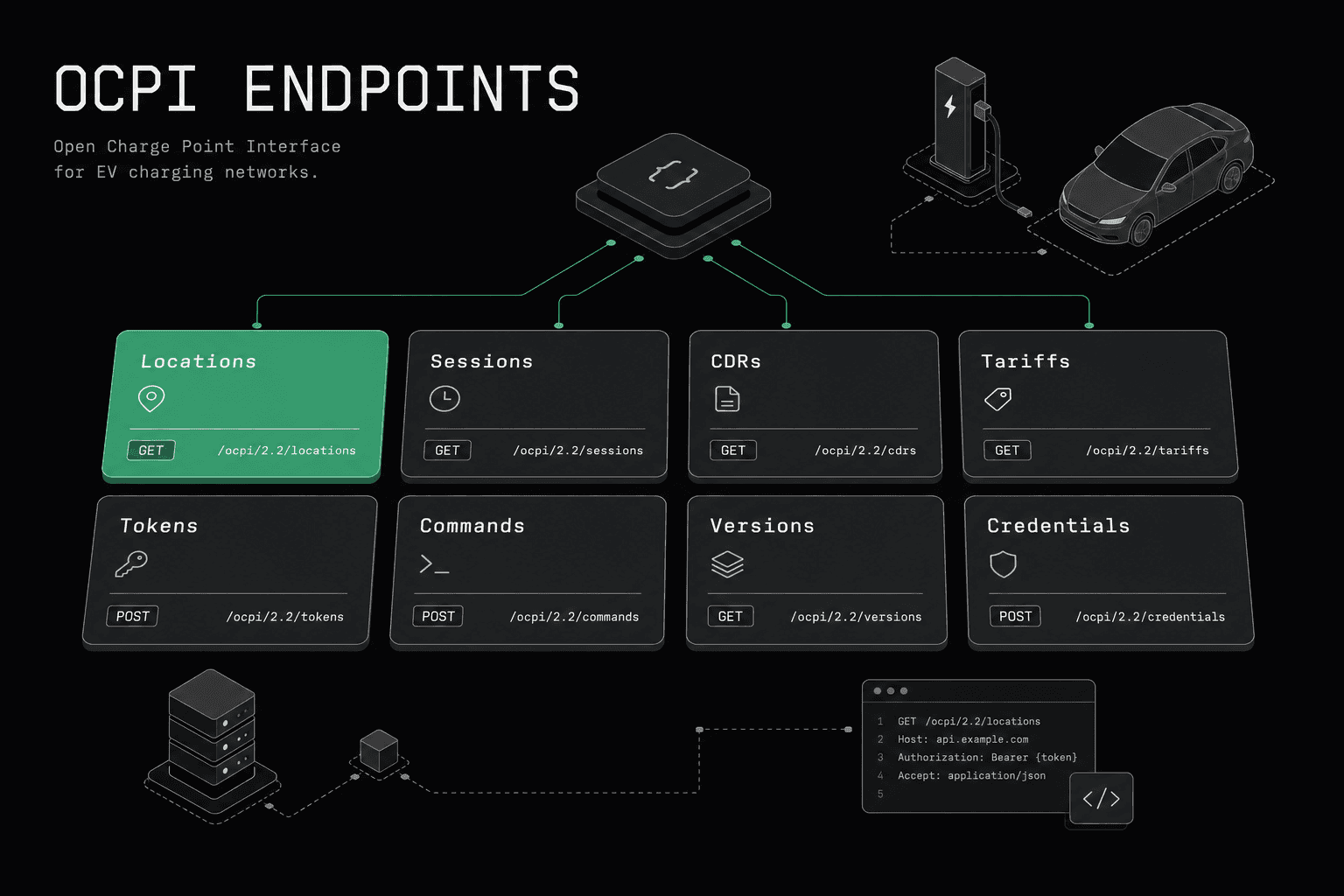
Quick answer: OCPI is a REST API where every endpoint is discovered dynamically through the versions endpoint. This reference documents all module endpoints — Locations, Sessions, CDRs, Tariffs, Tokens, Commands, plus the 2.2.1-only ChargingProfiles and HubClientInfo — covering methods, payloads, party ownership, and implementation notes for versions 2.1.1 and 2.2.1.
OCPI -- the Open Charge Point Interface maintained by the EV Roaming Foundation -- is a REST API protocol. Every interaction between a CPO and an eMSP -- or between either party and a roaming hub like GIREVE -- is a standard HTTP request carrying a JSON payload. There are no WebSocket connections, no binary frames, no persistent channels. If you understand REST, you understand the transport layer of OCPI. What makes OCPI distinct is its module-based architecture: each functional domain (locations, sessions, billing, authorization) has its own set of endpoints with clearly defined ownership between parties.
This reference covers every endpoint across all OCPI modules for versions 2.1.1 and 2.2.1. For each module, you will find the purpose, which party implements which endpoints, the full endpoint table, key data fields, and implementation notes. If you are new to OCPI as a protocol, start there first. This document assumes you understand the basics and need the endpoint-level detail.
For version-specific implementation validation, pair this reference with OCPI 2.1.1 testing and OCPI 2.2.1 testing.
How Are OCPI Base URLs Structured and Versioned?
Every OCPI implementation exposes a single entry point: the versions endpoint. From there, all module endpoints are discovered dynamically. There are no hardcoded paths. The base URL structure follows this pattern:
https://api.example.com/ocpi/
From this root, the protocol defines two discovery endpoints that every implementation must support:
GET /versions-- returns a list of supported OCPI versions with their URLsGET /versions/{version_id}-- returns the list of module endpoints for a specific version
A typical versions response looks like this:
{
  "status_code": 1000,
  "data": [
    {
      "version": "2.1.1",
      "url": "https://api.example.com/ocpi/2.1.1"
    },
    {
      "version": "2.2.1",
      "url": "https://api.example.com/ocpi/2.2.1"
    }
  ]
}
When you call the version-specific URL, you receive the full list of module endpoints that party supports:
{
  "status_code": 1000,
  "data": {
    "version": "2.1.1",
    "endpoints": [
      { "identifier": "credentials", "url": "https://api.example.com/ocpi/2.1.1/credentials" },
      { "identifier": "locations", "url": "https://api.example.com/ocpi/2.1.1/locations" },
      { "identifier": "sessions", "url": "https://api.example.com/ocpi/2.1.1/sessions" },
      { "identifier": "cdrs", "url": "https://api.example.com/ocpi/2.1.1/cdrs" },
      { "identifier": "tariffs", "url": "https://api.example.com/ocpi/2.1.1/tariffs" },
      { "identifier": "tokens", "url": "https://api.example.com/ocpi/2.1.1/tokens" },
      { "identifier": "commands", "url": "https://api.example.com/ocpi/2.1.1/commands" }
    ]
  }
}
This dynamic discovery is a core design principle. You never assume where a module lives. You always discover it through the version endpoint. This allows implementations to host modules on different servers, use different URL structures, or version independently.
How Does the OCPI Credentials Handshake Work?
OCPI uses token-based authentication. Every HTTP request includes an Authorization header with a Token prefix:
Authorization: Token IpbJOXxkxOAuKR92z0nEcmVF3Qc09VG7I7d/WCg0koM=
These tokens are not JWTs. They are opaque strings, typically base64-encoded random bytes. The critical aspect is how they are exchanged: through the credentials handshake.
The Credentials Exchange Flow
The credentials module is the only module that uses a pre-shared token (TOKEN_A) for initial authentication. OCPI 2.1.1 uses a Token A → Token B model (each side ends up with one credentials token). OCPI 2.2.1 introduces a third token (Token C) for hub-aware routing. The 2.1.1 flow:
Step 1: Out-of-band, Party A and Party B agree on a TOKEN_A. This is typically exchanged via email, a hub's admin portal, or a registration API.
Step 2: Party A calls GET /versions on Party B's platform, authenticating with TOKEN_A, to discover supported versions.
Step 3: Party A calls GET /versions/2.1.1 (or whichever version both support) to discover Party B's module endpoints.
Step 4: Party A sends POST /credentials to Party B, including:
- Party A's own credentials URL (its
/versionsendpoint) - A new token Party A generated for Party B to use when calling Party A
- Party A's business details (
party_id,country_code,business_details,roles)
Step 5: Party B validates the request using TOKEN_A, stores the token from the body, and responds with its own credentials object — including the token Party A will use to call Party B going forward (commonly called TOKEN_B).
From this point forward, TOKEN_A is invalidated. Party A uses the token from Step 5 to authenticate requests to Party B. Party B uses the token from Step 4 to authenticate requests to Party A.
OCPI 2.2.1 note: The hub-aware variant of this handshake adds TOKEN_C — a third token the hub uses to route between parties. The mechanics are otherwise the same.
Credentials Module Endpoints
| Method | Path | Description | Used By |
|---|---|---|---|
| GET | /credentials |
Retrieve the credentials object of the other party | Both |
| POST | /credentials |
Register with the other party (initial handshake) | Both |
| PUT | /credentials |
Update credentials (token rotation) | Both |
| DELETE | /credentials |
Unregister from the other party | Both |
The PUT /credentials endpoint allows either party to rotate tokens at any time without disrupting the connection. This is a significant security advantage and should be done periodically in production deployments.
What Does the Locations Module Do?
The Locations module is the backbone of OCPI. It contains the complete inventory of charge points, their physical locations, capabilities, and real-time status. Every roaming connection starts with location data exchange.
OCPI uses a three-level hierarchy: Location (a physical site) contains one or more EVSEs (individual charge points), each of which has one or more Connectors (physical sockets).
Implemented by: CPO (sender/owner of location data), eMSP (receiver)
CPO Endpoints (Sender Interface)
These endpoints are implemented by the CPO. The eMSP calls them to pull location data.
| Method | Path | Description |
|---|---|---|
| GET | /locations |
Fetch list of all locations (paginated, supports date_from/date_to filtering) |
| GET | /locations/{location_id} |
Fetch a specific location with all EVSEs and connectors |
| GET | /locations/{location_id}/{evse_uid} |
Fetch a specific EVSE |
| GET | /locations/{location_id}/{evse_uid}/{connector_id} |
Fetch a specific connector |
eMSP Endpoints (Receiver Interface)
These endpoints are implemented by the eMSP. The CPO calls them to push location updates.
| Method | Path | Description |
|---|---|---|
| PUT | /locations/{country_code}/{party_id}/{location_id} |
Push a full location object (create or replace) |
| PUT | /locations/{country_code}/{party_id}/{location_id}/{evse_uid} |
Push a full EVSE object |
| PUT | /locations/{country_code}/{party_id}/{location_id}/{evse_uid}/{connector_id} |
Push a full connector object |
| PATCH | /locations/{country_code}/{party_id}/{location_id} |
Partial update to a location |
| PATCH | /locations/{country_code}/{party_id}/{location_id}/{evse_uid} |
Partial update to an EVSE |
| PATCH | /locations/{country_code}/{party_id}/{location_id}/{evse_uid}/{connector_id} |
Partial update to a connector |
Key Location Data Fields
| Field | Type | Description |
|---|---|---|
id |
string | Unique identifier of the location within the CPO's platform |
type |
LocationType | ON_STREET, PARKING_GARAGE, UNDERGROUND_GARAGE, PARKING_LOT, OTHER |
address |
string | Street address |
city |
string | City name |
coordinates |
GeoLocation | Latitude and longitude |
evses |
EVSE[] | List of EVSEs at this location |
operator |
BusinessDetails | Operator information (name, website, logo) |
time_zone |
string | IANA time zone identifier (2.2.1 only) |
last_updated |
DateTime | Timestamp of the last update |
Key EVSE Data Fields
| Field | Type | Description |
|---|---|---|
uid |
string | Unique identifier within the CPO's platform |
evse_id |
string | Compliant EVSE ID following the standard format (e.g., DECPOE12345) |
status |
Status | AVAILABLE, BLOCKED, CHARGING, INOPERATIVE, OUTOFORDER, PLANNED, REMOVED, RESERVED, UNKNOWN |
connectors |
Connector[] | List of connectors on this EVSE |
capabilities |
Capability[] | CHARGING_PROFILE_CAPABLE, REMOTE_START_STOP_CAPABLE, RFID_READER, etc. |
last_updated |
DateTime | Timestamp of the last update |
Push vs Pull for Locations
In production, CPOs push EVSE status changes in real-time using PATCH requests. The eMSP uses GET /locations with date_from filtering for periodic full synchronization -- typically daily or weekly -- to catch any missed push updates. When a CPO sends a PATCH, it should include only the changed fields. A common implementation error is sending full objects via PATCH instead of partial updates, which defeats the purpose of the method.
How Does the Sessions Module Track Charging?
The Sessions module tracks active charging sessions in near-real-time. An eMSP uses session data to show drivers the status of their ongoing charge, including energy delivered, duration, and estimated cost.
Implemented by: CPO (sender/owner of session data), eMSP (receiver)
CPO Endpoints (Sender Interface)
| Method | Path | Description |
|---|---|---|
| GET | /sessions |
Fetch list of sessions (paginated, supports date_from/date_to) |
| GET | /sessions/{session_id} |
Fetch a specific session (2.1.1 only) |
eMSP Endpoints (Receiver Interface)
| Method | Path | Description |
|---|---|---|
| PUT | /sessions/{country_code}/{party_id}/{session_id} |
Push a full session object (create or replace) |
| PATCH | /sessions/{country_code}/{party_id}/{session_id} |
Partial update to a session (status change, energy update) |
Key Session Data Fields
| Field | Type | Description |
|---|---|---|
id |
string | Unique session identifier |
start_datetime |
DateTime | When the session started |
end_datetime |
DateTime | When the session ended (null if still active) |
kwh |
number | Total energy delivered in kWh |
auth_id |
string | Token used for authorization |
location |
Location | Reference to the location where charging occurs |
currency |
string | ISO 4217 currency code |
total_cost |
number | Current total cost (updated during charging) |
status |
SessionStatus | ACTIVE, COMPLETED, INVALID, PENDING |
last_updated |
DateTime | Timestamp of the last update |
Implementation Notes
During an active session, the CPO should push session updates to the eMSP at regular intervals -- typically every 30 to 60 seconds. Each update includes the latest kwh value and total_cost. When the session ends, a final PATCH sets the status to COMPLETED and the end_datetime. The session object is then considered immutable. For billing, always rely on the CDR, not the final session object.
What Are CDRs (Charge Detail Records) in OCPI?
CDRs are the billing backbone of OCPI. After a charging session completes, the CPO generates a CDR containing the definitive record of what was consumed and what it costs. CDRs are immutable once created -- they cannot be updated or deleted through OCPI.
Implemented by: CPO (sender), eMSP (receiver)
CPO Endpoints (Sender Interface)
| Method | Path | Description |
|---|---|---|
| GET | /cdrs |
Fetch list of CDRs (paginated, supports date_from/date_to) |
| GET | /cdrs/{cdr_id} |
Fetch a specific CDR (2.1.1 only, removed in 2.2.1 sender interface) |
eMSP Endpoints (Receiver Interface)
| Method | Path | Description |
|---|---|---|
| POST | /cdrs |
Push a new CDR to the eMSP |
| GET | /cdrs/{cdr_id} |
Fetch a specific CDR by ID (2.2.1 receiver can retrieve stored CDRs) |
Key CDR Data Fields
| Field | Type | Description |
|---|---|---|
id |
string | Unique CDR identifier |
start_date_time |
DateTime | Start of the charging session |
end_date_time |
DateTime | End of the charging session |
auth_id |
string | Token used for authorization |
auth_method |
AuthMethod | AUTH_REQUEST, COMMAND, WHITELIST |
location |
Location | Location where charging occurred |
currency |
string | ISO 4217 currency code |
total_cost |
number | Total cost of the session |
total_energy |
number | Total energy delivered in kWh |
total_time |
number | Total duration in hours |
total_parking_time |
number | Total idle/parking time in hours |
charging_periods |
ChargingPeriod[] | Detailed breakdown of the session into time periods with dimensions |
last_updated |
DateTime | Timestamp of last update |
Charging Periods and Dimensions
Each CDR contains an array of ChargingPeriod objects, which break the session into time-based segments. Each period has a start_date_time and an array of CdrDimension objects:
| Dimension Type | Description |
|---|---|
ENERGY |
Energy consumed in kWh during this period |
FLAT |
Flat fee applied (value is always 1 when present) |
MAX_CURRENT |
Maximum current in A during this period |
MIN_CURRENT |
Minimum current in A during this period |
PARKING_TIME |
Idle/parking time in hours |
TIME |
Charging time in hours |
These dimensions map directly to tariff elements, enabling precise cost calculation. If you are building a billing system, the CDR's charging periods are the source of truth for invoice generation.
Tariffs Module
The Tariffs module defines pricing structures for charging sessions. CPOs publish their tariffs so eMSPs can display estimated costs to drivers before they start charging.
Implemented by: CPO (sender), eMSP (receiver)
CPO Endpoints (Sender Interface)
| Method | Path | Description |
|---|---|---|
| GET | /tariffs |
Fetch list of all tariffs (paginated, supports date_from/date_to) |
eMSP Endpoints (Receiver Interface)
| Method | Path | Description |
|---|---|---|
| PUT | /tariffs/{country_code}/{party_id}/{tariff_id} |
Push a full tariff object (create or replace) |
| DELETE | /tariffs/{country_code}/{party_id}/{tariff_id} |
Remove a tariff |
Key Tariff Data Fields
| Field | Type | Description |
|---|---|---|
id |
string | Unique tariff identifier |
currency |
string | ISO 4217 currency code |
elements |
TariffElement[] | List of pricing elements |
type |
TariffType | AD_HOC_PAYMENT, PROFILE_CHEAP, PROFILE_FAST, PROFILE_GREEN, REGULAR (2.2.1 only) |
tariff_alt_text |
DisplayText[] | Human-readable tariff description |
tariff_alt_url |
URL | Link to a human-readable tariff page |
energy_mix |
EnergyMix | Energy source information (renewable percentage, etc.) |
last_updated |
DateTime | Timestamp of last update |
Tariff Elements and Restrictions
Each TariffElement contains a list of PriceComponent objects and optional TariffRestrictions:
Price Components:
| Field | Description |
|---|---|
type |
ENERGY (per kWh), FLAT (per session), PARKING_TIME (per hour idle), TIME (per hour charging) |
price |
Price per unit excluding VAT |
step_size |
Minimum granularity (e.g., step_size=300 for TIME means billing in 5-minute increments) |
Tariff Restrictions (conditions under which the element applies):
| Field | Description |
|---|---|
start_time / end_time |
Time-of-day restrictions |
start_date / end_date |
Date range restrictions |
min_kwh / max_kwh |
Energy consumption range |
min_power / max_power |
Power range |
min_duration / max_duration |
Session duration range |
day_of_week |
Day-of-week restrictions |
This structure enables complex pricing models: different rates for peak vs off-peak hours, penalties for overstaying after charging completes, tiered energy pricing, and more.
How Does the Tokens Module Handle Authorization?
The Tokens module handles driver authorization. eMSPs push their driver tokens (RFID cards, app credentials) to CPOs so that authorization can happen locally without requiring a real-time API call for every charge attempt.
Implemented by: eMSP (sender/owner of token data), CPO (receiver)
Note the reversed ownership: unlike most modules where the CPO is the data owner, here the eMSP owns and pushes token data to the CPO.
eMSP Endpoints (Sender Interface)
| Method | Path | Description |
|---|---|---|
| GET | /tokens |
Fetch list of all tokens (paginated, supports date_from/date_to) |
| GET | /tokens/{token_uid} |
Fetch a specific token (2.1.1) |
CPO Endpoints (Receiver Interface)
| Method | Path | Description |
|---|---|---|
| GET | /tokens/{country_code}/{party_id}/{token_uid} |
Fetch a specific token |
| PUT | /tokens/{country_code}/{party_id}/{token_uid} |
Push a full token (create or replace) |
| PATCH | /tokens/{country_code}/{party_id}/{token_uid} |
Partial update to a token |
| POST | /tokens/{token_uid}/authorize |
Real-time authorization request (CPO asks eMSP to authorize a token) |
Key Token Data Fields
| Field | Type | Description |
|---|---|---|
uid |
string | Unique token identifier (e.g., RFID UID) |
type |
TokenType | RFID, OTHER (2.1.1); RFID, APP_USER, AD_HOC_USER, OTHER (2.2.1) |
auth_id |
string | Authorization identifier linking the token to a contract |
visual_number |
string | Number printed on the token (if physical card) |
issuer |
string | Name of the token issuer |
valid |
boolean | Whether the token is currently valid for authorization |
whitelist |
WhitelistType | ALWAYS (always accept offline), ALLOWED (accept offline, verify later), ALLOWED_OFFLINE (accept only when CPO is offline), NEVER (always verify online) — all four values present in 2.1.1 and 2.2.1 |
language |
string | Preferred language of the driver |
last_updated |
DateTime | Timestamp of last update |
Real-Time Authorization
The POST /tokens/{token_uid}/authorize endpoint is special. When a driver presents an RFID card at a charger, the CPO's backend can call this endpoint on the eMSP to get a real-time authorization decision. The eMSP responds with an AuthorizationInfo object containing ALLOWED, BLOCKED, EXPIRED, NO_CREDIT, or NOT_ALLOWED. This is used when the whitelist value is NEVER or when the token is not in the CPO's local cache.
What Does the Commands Module Enable?
The Commands module enables remote operations on charge points through the roaming chain. An eMSP can instruct a CPO to start a session, stop a session, reserve a charger, or unlock a connector -- all on behalf of the driver.
Implemented by: CPO (receiver of commands), eMSP (sender of commands)
CPO Endpoints (Receiver Interface)
| Method | Path | Description |
|---|---|---|
| POST | /commands/START_SESSION |
Request the CPO to start a charging session |
| POST | /commands/STOP_SESSION |
Request the CPO to stop an active session |
| POST | /commands/RESERVE_NOW |
Request the CPO to reserve a charge point |
| POST | /commands/UNLOCK_CONNECTOR |
Request the CPO to unlock a connector |
eMSP Endpoints (Callback)
| Method | Path | Description |
|---|---|---|
| POST | {callback_url} |
Async result callback -- CPO posts the command result to the URL provided in the original request |
Command Request Fields
START_SESSION:
| Field | Description |
|---|---|
response_url |
Callback URL for the async result |
token |
Token object identifying the driver |
location_id |
Target location |
evse_uid |
Target EVSE (optional in 2.1.1, required in 2.2.1) |
STOP_SESSION:
| Field | Description |
|---|---|
response_url |
Callback URL for the async result |
session_id |
ID of the session to stop |
RESERVE_NOW:
| Field | Description |
|---|---|
response_url |
Callback URL for the async result |
token |
Token object identifying the driver |
location_id |
Target location |
evse_uid |
Target EVSE |
expiry_date |
When the reservation expires |
UNLOCK_CONNECTOR:
| Field | Description |
|---|---|
response_url |
Callback URL for the async result |
location_id |
Target location |
evse_uid |
Target EVSE |
connector_id |
Target connector |
Asynchronous Command Flow
Commands are asynchronous by design. The flow is:
- eMSP sends
POST /commands/START_SESSIONto the CPO - CPO responds immediately with
ACCEPTEDorREJECTED(synchronous response indicating whether the command was received, not whether it succeeded) - CPO forwards the command to the charger via OCPP
- When the charger responds, the CPO sends the final result (
ACCEPTED,REJECTED,TIMEOUT,UNKNOWN_SESSION, etc.) to theresponse_urlprovided in the original request
This two-step flow is necessary because charger communication via OCPP can take several seconds. The eMSP must handle both the synchronous acknowledgment and the asynchronous callback.
ChargingProfiles Module (2.2.1 Only)
The ChargingProfiles module was introduced in OCPI 2.2.1 to enable smart charging through the roaming chain. It allows an eMSP or hub to set power limits on active charging sessions, enabling demand response, fleet management, and grid balancing use cases.
Implemented by: CPO (receiver), eMSP (sender)
CPO Endpoints (Receiver Interface)
| Method | Path | Description |
|---|---|---|
| PUT | /chargingprofiles/{session_id} |
Set or update a charging profile for an active session |
| DELETE | /chargingprofiles/{session_id} |
Clear the charging profile for an active session |
| GET | /chargingprofiles/{session_id} |
Request the active charging profile for a session |
eMSP Endpoints (Callback)
| Method | Path | Description |
|---|---|---|
| POST | {callback_url} |
Async result callback with the command outcome or the active profile |
Charging Profile Structure
| Field | Type | Description |
|---|---|---|
start_date_time |
DateTime | Start time for the profile |
duration |
integer | Duration in seconds |
charging_rate_unit |
ChargingRateUnit | W (watts) or A (amperes) |
min_charging_rate |
number | Minimum charging rate |
charging_profile_period |
ChargingProfilePeriod[] | Time-based power limits |
Each ChargingProfilePeriod specifies:
start_period: Offset in seconds fromstart_date_timelimit: Maximum power (W) or current (A) for this period
This module maps closely to OCPP's Smart Charging profile. The CPO translates the OCPI charging profile into an OCPP SetChargingProfile request sent to the charger.
HubClientInfo Module (2.2.1 Only)
The HubClientInfo module is used exclusively in hub-based topologies (like GIREVE or Hubject). It allows the hub to inform connected parties about the status and capabilities of other parties connected to the hub.
Implemented by: Hub (sender), CPO/eMSP (receiver)
Hub Endpoints (Sender Interface)
| Method | Path | Description |
|---|---|---|
| GET | /hubclientinfo |
Fetch list of all connected parties (paginated) |
CPO/eMSP Endpoints (Receiver Interface)
| Method | Path | Description |
|---|---|---|
| PUT | /hubclientinfo/{country_code}/{party_id} |
Push client info for a connected party |
| DELETE | /hubclientinfo/{country_code}/{party_id} |
Notify that a party has disconnected |
Key HubClientInfo Data Fields
| Field | Type | Description |
|---|---|---|
party_id |
string (CiString3) | Three-character party identifier (e.g. EXP) |
country_code |
string | ISO 3166-1 alpha-2 country code (e.g. FR, DE) in 2.2.1 |
role |
Role | CPO, EMSP, HUB, NSP, NAP, SCSP, OTHER |
status |
ConnectionStatus | CONNECTED, OFFLINE, PLANNED, SUSPENDED |
last_updated |
DateTime | Timestamp of last update |
This module is primarily used for discovery. An eMSP can use it to know which CPOs are reachable through the hub and what their connection status is.
OCPI Data Types Reference
Several data types are shared across multiple modules. Understanding these is essential for correct implementation.
Common Enumerations
| Type | Values | Used In |
|---|---|---|
Status |
AVAILABLE, BLOCKED, CHARGING, INOPERATIVE, OUTOFORDER, PLANNED, REMOVED | Locations (EVSE status) |
ConnectorType |
CHADEMO, IEC_62196_T1 (Type 1), IEC_62196_T2 (Type 2), IEC_62196_T2_COMBO (CCS2), TESLA_S, DOMESTIC_A, etc. | Locations (Connector) |
ConnectorFormat |
SOCKET, CABLE | Locations (Connector) |
PowerType |
AC_1_PHASE, AC_3_PHASE, DC | Locations (Connector) |
Capability |
CHARGING_PROFILE_CAPABLE, CREDIT_CARD_PAYABLE, REMOTE_START_STOP_CAPABLE, RESERVABLE, RFID_READER, UNLOCK_CAPABLE | Locations (EVSE) |
TokenType |
RFID, OTHER (2.1.1); RFID, APP_USER, AD_HOC_USER, OTHER (2.2.1) |
Tokens |
AuthMethod |
AUTH_REQUEST, COMMAND, WHITELIST | CDRs |
SessionStatus |
ACTIVE, COMPLETED, INVALID, PENDING | Sessions |
CommandResponseType |
NOT_SUPPORTED, REJECTED, ACCEPTED, UNKNOWN_SESSION, TIMEOUT | Commands |
CdrToken Object (OCPI 2.2.1 only)
The CdrToken is a lightweight token reference embedded within CDRs and Sessions in OCPI 2.2.1. It was introduced to replace the bare auth_id string used in 2.1.1.
| Field | Type | Description |
|---|---|---|
uid |
string | Token UID |
type |
TokenType | RFID, APP_USER, AD_HOC_USER, OTHER |
contract_id |
string | Contract identifier (e.g., EMAID) |
In OCPI 2.1.1, Sessions and CDRs identify the authorization with a bare
auth_idstring and anauth_methodenum, not a structuredcdr_tokenobject. The 2.1.1 Session/CDR objects also embed the fullLocationrather than referencing it by IDs.
DisplayText Object
Used throughout OCPI for multilingual text content:
| Field | Type | Description |
|---|---|---|
language |
string | ISO 639-1 language code |
text |
string | The text content |
GeoLocation Object
| Field | Type | Description |
|---|---|---|
latitude |
string | Latitude in decimal degrees (string type to preserve precision) |
longitude |
string | Longitude in decimal degrees |
Note that coordinates are strings, not floating-point numbers. This is intentional to avoid floating-point precision loss during serialization.
How Does OCPI Handle Errors and Status Codes?
Every OCPI response includes a status_code field. This is distinct from the HTTP status code. The OCPI status code provides protocol-level information about the request outcome.
OCPI Status Code Ranges
| Range | Category | Description |
|---|---|---|
| 1xxx | Success | Request processed successfully |
| 2xxx | Client errors | Problem with the request from the client |
| 3xxx | Server errors | Problem on the server side |
| 4xxx | Hub errors (2.2.1 only) | Problem in hub-mediated routing; not present in 2.1.1 |
Specific Status Codes
| Code | Meaning |
|---|---|
| 1000 | Generic success |
| 2000 | Generic client error |
| 2001 | Invalid or missing parameters |
| 2002 | Not enough information (e.g., unknown location) |
| 2003 | Unknown token |
| 3000 | Generic server error |
| 3001 | Unable to use the client's API (e.g., connection refused, timeout) |
| 3002 | Unsupported version |
| 3003 | No matching endpoints |
HTTP Status Codes
OCPI also uses standard HTTP status codes:
| HTTP Code | Usage |
|---|---|
| 200 | Successful GET, PUT, PATCH, DELETE |
| 201 | Successful POST (resource created) |
| 400 | Bad request (malformed JSON, missing required fields) |
| 401 | Unauthorized (invalid or missing token) |
| 404 | Resource not found |
| 405 | Method not allowed |
A critical implementation detail: always check both the HTTP status code AND the OCPI status code. A 200 HTTP response with an OCPI status code of 2001 means the request was received but contained invalid parameters. Many implementations incorrectly check only the HTTP code and miss protocol-level errors.
Pagination
All GET list endpoints support pagination through the following headers and parameters:
Request parameters: offset (starting index), limit (max items per page), date_from, date_to
Response headers: X-Total-Count (total number of objects), X-Limit (server-imposed max per page), Link (URL to next page)
Always respect the server's X-Limit header. If you request limit=1000 but the server returns X-Limit: 100, you must paginate with 100-item pages.
What Changed Between OCPI 2.1.1 and 2.2.1?
While the core architecture remains the same, OCPI 2.2.1 introduced several important changes. The full specifications for both versions are published by the EV Roaming Foundation:
New Modules in 2.2.1
- ChargingProfiles: Smart charging through the roaming chain (described above)
- HubClientInfo: Hub connection status information (described above)
Structural Changes
| Area | 2.1.1 | 2.2.1 |
|---|---|---|
| Token authorize | POST /tokens/{token_uid}/authorize |
Path includes {type}: POST /tokens/{token_uid}/authorize?type=RFID |
| CDR sender GET by ID | GET /cdrs/{cdr_id} available |
Removed from sender interface |
| Session sender GET by ID | GET /sessions/{session_id} available |
Removed from sender interface |
| Tariff types | No type field |
Added TariffType enum for categorization |
| Location time zones | Not available | Added time_zone field to Location objects |
| EVSE ID format | Recommended | More strictly defined |
| Connector ID in commands | Not required for START_SESSION | evse_uid required for START_SESSION |
Module Identifier Changes
The module identifiers used in version endpoint discovery are the same across both versions: credentials, locations, sessions, cdrs, tariffs, tokens, commands. The 2.2.1 additions use chargingprofiles and hubclientinfo.
Data Model Changes
In 2.2.1, several objects gained additional fields for richer data exchange. The Location object added time_zone and publish fields. The Tariff object added the type field for categorizing pricing structures. The Token object refined the whitelist types and added group_id for corporate fleet management.
If you are implementing a new system, target 2.2.1 as the primary version. Most hubs and major CPOs/eMSPs support 2.2.1. Maintain 2.1.1 compatibility only if your roaming partners require it.
Frequently Asked Questions
How does OCPI differ from OCPP?
OCPP is the protocol between a charger and a backend system (CPMS). It uses WebSocket connections and handles charge point management, firmware updates, and local authorization. OCPI is the protocol between backend systems (CPO-to-eMSP or CPO-to-Hub). It uses standard REST APIs and handles roaming, data exchange, and inter-network billing. A typical deployment uses both: OCPP from charger to CPO backend, and OCPI from CPO backend to eMSP or hub.
Do I need to implement all OCPI modules?
No. The only mandatory module is Credentials. All other modules are optional. In practice, a minimal viable implementation typically includes Locations, Sessions, CDRs, and Tokens. Commands is highly recommended if you want to support remote start/stop from roaming partners. Tariffs is important for cost transparency.
How do roaming hubs like GIREVE fit into the endpoint structure?
A roaming hub acts as an intermediary. Instead of establishing direct peer-to-peer OCPI connections with every partner, you connect once to the hub. The hub then proxies requests to and from all other connected parties. From an endpoint perspective, your implementation is identical -- you implement the same sender/receiver interfaces. The only addition is the HubClientInfo module (2.2.1), which the hub uses to inform you about other connected parties.
What happens if a push update fails?
OCPI does not define a retry mechanism in the specification. If a push request fails (network error, 5xx response), the sending party should implement its own retry logic with exponential backoff. The pull mechanism serves as a safety net: the receiving party's periodic pull synchronization will eventually catch updates that were missed during push failures.
Can I use OCPI without a roaming hub?
Yes. OCPI supports direct peer-to-peer connections between a CPO and an eMSP. This is common in markets where a CPO has a small number of roaming partners. However, as the number of partners grows, the hub model becomes more efficient because it reduces the number of connections from O(n^2) to O(n).
What is the difference between PUT and PATCH in OCPI?
PUT replaces the entire object. The request body must contain all required fields. PATCH performs a partial update -- only the fields included in the request body are updated. In practice, use PUT when creating or fully replacing an object, and PATCH for incremental updates like status changes. A PATCH with a field set to null removes that optional field from the object.
OCPI's module-based, REST architecture makes it approachable for any team with HTTP API experience. The key to a successful implementation is getting the credential handshake right, implementing both push and pull modes for resilience, and testing thoroughly against real roaming partners or a hub's sandbox environment. For testing your OCPP charger integration that feeds data into your OCPI layer, an OCPP emulator can validate your entire charging and roaming chain end-to-end.