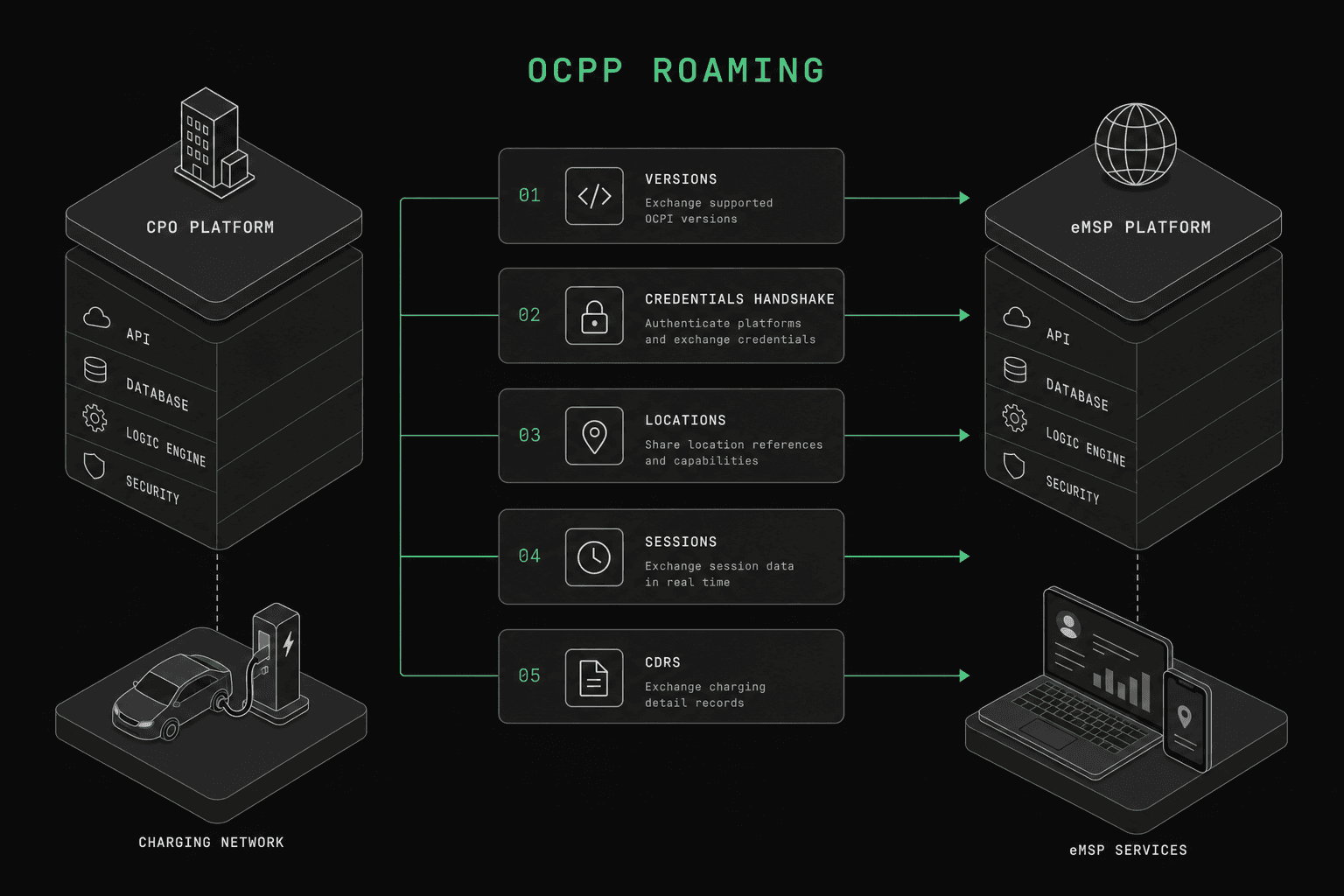
Quick answer: To implement OCPI roaming, define your role (CPO, eMSP, or both), choose OCPI 2.1.1, and pick a roaming hub or direct P2P. Build version discovery and credential exchange first, then Locations, Tokens, Sessions, CDRs, and Tariffs, and connect through a hub like GIREVE or Hubject. Expect a basic build to take several weeks.
Implementing OCPI roaming is one of the most impactful things you can do for your EV charging business. It connects your network to thousands of chargers (if you are an eMSP) or thousands of drivers (if you are a CPO). But the protocol documentation is dense, the edge cases are numerous, and the testing options are limited.
This guide walks you through the full OCPI 2.1.1 implementation process, step by step. In our experience, a basic implementation takes a small team several weeks. A production-grade implementation with hub certification, robust error handling, and real-time sync takes considerably longer—on the order of several months, depending on your existing infrastructure.
We are going to cover every module you need, in the order you should build them.
Before You Start
Before writing a single line of code, you need to make three decisions.
1. Define Your Role: CPO, eMSP, or Both
Your role determines which OCPI modules you implement and in which direction data flows.
- CPO (Charge Point Operator): You own and operate chargers. You push location data, receive authorization requests, send session updates, and generate CDRs.
- eMSP (e-Mobility Service Provider): You manage drivers and their payments. You push tokens, receive session data, receive CDRs, and display tariffs.
- Both: Many companies operate as both CPO and eMSP. You will need to implement both sides of every module.
If you are unsure about the distinction, read our breakdown of CPO vs eMSP roles before continuing.
2. Choose Your OCPI Version
OCPI 2.1.1 is the recommended starting point. It has the broadest adoption across European roaming hubs, is well-documented in the official OCPI specification maintained by the EVRoaming Foundation, and covers all core roaming use cases. OCPI 2.2 and 2.2.1 add features like smart charging commands and improved tariff structures, but hub support varies. Start with 2.1.1, then upgrade modules incrementally.
3. Select a Roaming Hub or Direct P2P
You have two connectivity options:
- Hub-based roaming (GIREVE, Hubject, e-clearing.net): One integration gives you access to hundreds of partners. The hub handles message routing and often provides certification testing. This is the standard approach.
- Direct peer-to-peer: You connect directly to each partner. More control, but you need to manage each connection individually. Only practical if you have a small number of partners.
For most companies, hub-based roaming through GIREVE or Hubject is the right call. The rest of this guide assumes hub-based integration, though the module implementation is identical for P2P.
Step 1: How Do You Implement Version Discovery?
Every OCPI implementation starts with the /versions endpoint. This is the entry point that tells partners which OCPI versions you support and where to find each module.
Your /versions endpoint returns a list of supported versions:
{
  "status_code": 1000,
  "data": [
    {
      "version": "2.1.1",
      "url": "https://your-platform.com/ocpi/2.1.1"
    }
  ]
}
When a partner hits the version-specific URL, they get the list of module endpoints:
{
  "status_code": 1000,
  "data": {
    "version": "2.1.1",
    "endpoints": [
      { "identifier": "credentials", "url": "https://your-platform.com/ocpi/2.1.1/credentials" },
      { "identifier": "locations", "url": "https://your-platform.com/ocpi/2.1.1/locations" },
      { "identifier": "tokens", "url": "https://your-platform.com/ocpi/2.1.1/tokens" },
      { "identifier": "sessions", "url": "https://your-platform.com/ocpi/2.1.1/sessions" },
      { "identifier": "cdrs", "url": "https://your-platform.com/ocpi/2.1.1/cdrs" },
      { "identifier": "tariffs", "url": "https://your-platform.com/ocpi/2.1.1/tariffs" }
    ]
  }
}
Implementation notes:
- Use HTTPS. No exceptions.
- All responses follow the same envelope:
status_code,data,timestamp, and optionallystatus_message. - The
status_code1000 means success. Anything in the 2xxx or 3xxx range indicates an error.
This endpoint is trivial to build, but get it right. Every partner interaction begins here.
Step 2: How Does Credential Exchange Work?
The credential exchange is the OCPI handshake. It establishes mutual trust between two parties by exchanging authentication tokens.
Here is the flow:
- Party A receives an initial token (TOKEN_A) out-of-band, typically through a hub portal or direct email.
- Party A uses TOKEN_A to call Party B's
/versionsendpoint, discovering the credentials module URL. - Party A sends a
POST /credentialsrequest to Party B, including Party A's own credentials (its URL and a new token for Party B to use). - Party B validates TOKEN_A, stores Party A's credentials, and responds with Party B's credentials (including TOKEN_B).
- From this point forward, Party A uses TOKEN_B to authenticate requests to Party B, and Party B uses the token Party A provided to authenticate requests to Party A.
The POST body looks like this (OCPI 2.1.1 — note country_code is the alpha-3 ISO 3166-1 code; OCPI 2.2.1 uses alpha-2):
{
  "url": "https://party-a.com/ocpi/versions",
  "token": "party-a-token-for-party-b-to-use",
  "party_id": "PAR",
  "country_code": "FRA",
  "business_details": {
    "name": "Party A"
  }
}
Critical implementation details:
- Store both tokens securely. These are bearer tokens used for all subsequent API calls.
- TOKEN_A is single-use. After the credential exchange completes, TOKEN_A should be invalidated. Only the newly exchanged tokens are valid.
- Support
PUT /credentialsfor token rotation. Partners will periodically update their tokens, and your system must handle this without downtime. - Validate the token on every request. Check the Authorization header against your stored tokens. Return a 401 if the token does not match.
If you are integrating through a hub like GIREVE, the hub manages the initial token distribution and may handle parts of the credential exchange on your behalf. But you still need to implement the credentials module.
Step 3: How Do You Implement the Locations Module (CPO)?
If you are a CPO, the Locations module is your most important implementation. It publishes your charger infrastructure to the roaming network.
OCPI models charging infrastructure as a three-level hierarchy:
- Location: A physical site (e.g., a parking garage, a highway rest stop). Contains address, coordinates, opening hours, and facilities.
- EVSE: An Electric Vehicle Supply Equipment unit at that location. Each EVSE has a unique
evse_uidand a status (AVAILABLE,BLOCKED,CHARGING,INOPERATIVE,OUTOFORDER,PLANNED,REMOVED,RESERVED,UNKNOWN). - Connector: A physical plug on an EVSE. Defined by connector type (Type 2, CCS, CHAdeMO), power type (AC/DC), and max power.
A typical location object:
{
  "id": "LOC001",
  "type": "ON_STREET",
  "name": "Main Street Charging Hub",
  "address": "123 Main Street",
  "city": "Paris",
  "country": "FRA",
  "coordinates": { "latitude": "48.8566", "longitude": "2.3522" },
  "evses": [
    {
      "uid": "EVSE001",
      "status": "AVAILABLE",
      "connectors": [
        {
          "id": "1",
          "standard": "IEC_62196_T2",
          "format": "SOCKET",
          "power_type": "AC_3_PHASE",
          "max_voltage": 400,
          "max_amperage": 32
        }
      ]
    }
  ],
  "last_updated": "2025-03-16T10:30:00Z"
}
You need to support two data flow patterns:
- Pull (GET): Partners can fetch your full location list via pagination. Implement
GET /locationswithoffsetandlimitquery parameters, and supportdate_from/date_tofiltering so partners can pull only recent changes. - Push (PUT/PATCH): For real-time updates, push changes to connected partners or the hub. When an EVSE status changes from AVAILABLE to CHARGING, send a
PATCHto the partner's receiver endpoint immediately.
Real-time status updates are critical. Drivers rely on up-to-date availability information. If your status updates lag by more than a few seconds, the user experience degrades rapidly, with drivers arriving at chargers that show as available but are actually in use.
Step 4: How Do You Implement the Tokens Module (eMSP)?
If you are an eMSP, the Tokens module lets CPOs authorize your drivers at their chargers.
A token represents a driver's authorization credential, typically linked to an RFID card, an app account, or both. You push your tokens to connected CPOs so they can perform local authorization without calling back to your server for every charge session.
A token object:
{
  "uid": "RFID-001234567890",
  "type": "RFID",
  "auth_id": "USER-12345",
  "issuer": "Your eMSP Name",
  "valid": true,
  "whitelist": "ALLOWED",
  "last_updated": "2025-03-16T08:00:00Z"
}
The whitelist field controls authorization behavior. OCPI defines four values:
- ALWAYS: The CPO must always authorize locally without contacting the eMSP.
- ALLOWED: Local authorization is allowed, and the CPO may also call the eMSP for real-time verification when it wants to.
- ALLOWED_OFFLINE: Local authorization is allowed only when the CPO cannot reach the eMSP (offline fallback).
- NEVER: The CPO must always do a real-time authorization request to the eMSP — never authorize locally.
(Note: to reject a token entirely, set the token's valid flag to false rather than using a whitelist value — there is no NOT_ALLOWED value in WhitelistType.)
For real-time authorization (when whitelist is NEVER or when the CPO wants to double-check), the CPO sends a POST /tokens/{token_uid}/authorize request to the eMSP. Your eMSP must respond within a few seconds. Slow responses mean drivers waiting at chargers, which is unacceptable.
Push token updates to CPOs whenever a token is created, modified, or revoked. A driver losing their RFID card should result in an immediate token invalidation pushed to all connected CPOs.
Step 5: How Do You Implement the Sessions Module?
The Sessions module tracks active charging sessions in real time. CPOs push session data to eMSPs so drivers can see their ongoing charge in their app.
A session goes through these states:
- ACTIVE: Charging is in progress. The CPO sends periodic updates with current energy delivered and cost.
- COMPLETED: Charging finished. Final session data is sent.
- INVALID: Something went wrong. The session is flagged for review.
The CPO creates a session when charging starts and pushes updates to the eMSP via PUT /sessions/{session_id}. Updates should be sent frequently; the more often you push, the better the driver experience, at the cost of more traffic. Match your cadence to what your hub partner expects.
A session object includes:
{
  "id": "SESSION-001",
  "start_datetime": "2025-03-16T10:00:00Z",
  "kwh": 15.5,
  "auth_id": "USER-12345",
  "location": { "...location reference..." },
  "currency": "EUR",
  "total_cost": 8.25,
  "status": "ACTIVE",
  "last_updated": "2025-03-16T10:30:00Z"
}
Key implementation points:
- Idempotency: Use
PUTsemantics. If the eMSP receives the same session update twice, it should overwrite, not duplicate. - Cost calculation: The CPO calculates the running cost based on published tariffs. The eMSP displays this to the driver.
- Session references: Link sessions to locations, EVSEs, and connectors so the eMSP can show context to the driver.
Step 6: How Do You Implement the CDRs Module?
Charge Detail Records (CDRs) are the billing backbone of OCPI roaming. After a session completes, the CPO generates a CDR and pushes it to the eMSP.
A CDR is the final, immutable record of a charging session. It contains everything needed for settlement:
{
  "id": "CDR-001",
  "start_date_time": "2025-03-16T10:00:00Z",
  "stop_date_time": "2025-03-16T10:45:00Z",
  "auth_id": "USER-12345",
  "total_energy": 22.5,
  "total_time": 2700,
  "total_cost": 12.75,
  "currency": "EUR",
  "charging_periods": [
    {
      "start_date_time": "2025-03-16T10:00:00Z",
      "dimensions": [
        { "type": "ENERGY", "volume": 22.5 },
        { "type": "TIME", "volume": 0.75 }
      ]
    }
  ],
  "last_updated": "2025-03-16T10:46:00Z"
}
The CDR lifecycle:
- CPO generates the CDR after the session ends.
- CPO pushes the CDR to the eMSP via
POST /cdrs. - The eMSP validates the CDR against the session data and published tariffs.
- If accepted, the eMSP processes the charge to the driver and settles with the CPO according to their roaming agreement.
CDRs are critical for revenue. Every field matters. Missing or incorrect data leads to billing disputes, which are expensive to resolve manually. Validate your CDR generation against multiple tariff scenarios before going live.
Step 7: How Do You Implement the Tariffs Module?
The Tariffs module lets CPOs publish their pricing so eMSPs can display costs to drivers before they start charging.
OCPI tariffs support multiple price components:
- ENERGY: Price per kWh of energy delivered.
- TIME: Price per hour of charging time.
- FLAT: A fixed fee per session.
- PARKING_TIME: Price per hour after charging completes (to discourage blocking chargers).
A tariff example:
{
  "id": "TARIFF-001",
  "currency": "EUR",
  "elements": [
    {
      "price_components": [
        { "type": "FLAT", "price": 1.00, "step_size": 1 },
        { "type": "ENERGY", "price": 0.35, "step_size": 1 },
        { "type": "PARKING_TIME", "price": 5.00, "step_size": 300 }
      ]
    }
  ],
  "last_updated": "2025-03-16T08:00:00Z"
}
The step_size field defines billing granularity. A step_size of 1 for energy means billing per Wh. A step_size of 300 for parking time means billing in 5-minute blocks. Getting step_size wrong is one of the most common tariff bugs, so test your cost calculations thoroughly.
Tariffs can include restrictions (time of day, min/max kWh, specific connector types) that determine when each tariff element applies. This complexity is where most implementations struggle. Start simple, with a flat energy tariff, then add complexity.
Step 8: Hub Integration
With your modules implemented, it is time to connect to a roaming hub.
GIREVE
GIREVE is the dominant European roaming hub for OCPI. Their integration process:
- Sign a roaming agreement with GIREVE.
- Connect to their test environment (IOP QA). Implement version discovery and credential exchange against their test endpoints.
- Pass certification tests. GIREVE runs automated tests against each module. They test standard flows, edge cases, and error handling.
- Go live on production. Once certified, GIREVE connects you to their partner network.
GIREVE has specific requirements beyond the OCPI spec, such as mandatory fields, data quality checks, and response time limits. Read GIREVE's integration documentation carefully.
Hubject
Hubject primarily uses OICP (their own protocol), but increasingly supports OCPI as well. If you are evaluating both, see our comparison of OCPI vs OICP vs OCHP.
Hub-Specific Considerations
- Message routing: Hubs add a routing layer. Your
country_codeandparty_idare used to route messages to the right partner. - Data quality: Hubs enforce data quality standards. Incomplete location data or missing GPS coordinates will be rejected.
- Response times: Hubs typically require responses within a short, defined window, so optimize your endpoints and check your hub's documented limits.
- Pagination: Hubs pull large datasets. Your pagination implementation must handle thousands of records efficiently.
How Do You Test Your OCPI Implementation?
This is where most teams struggle. Testing OCPI properly requires a counterpart, a CPO to test your eMSP code and an eMSP to test your CPO code.
Your testing options:
- Test against the hub's QA environment. This is necessary but limited. Hub test environments often have restricted scenarios and slow feedback cycles.
- Test against a real partner. Slow, requires coordination, and you risk exposing bugs in a semi-production setting.
- Build your own mock server. Time-consuming to build and maintain. You end up spending as much time on the mock as on the real implementation.
- Use OCPPLab. Our platform simulates both CPO and eMSP endpoints, letting you test every module and every edge case without waiting for a partner or hub. You can run through the full credential exchange, push locations, authorize tokens, create sessions, and generate CDRs, all against a simulated counterpart that validates your implementation against the OCPI spec.
A solid testing strategy covers:
- Happy path: Full flow from credential exchange through CDR generation.
- Error handling: Invalid tokens, malformed requests, timeout scenarios.
- Edge cases: Timezone boundaries in CDRs, tariff changes mid-session, concurrent session updates.
- Performance: Pagination with thousands of locations, high-frequency status updates.
What Are the Most Common OCPI Implementation Pitfalls?
After working with dozens of OCPI implementations, these are the issues we see most frequently.
Timezone handling in CDRs. OCPI requires UTC timestamps. But charger hardware often reports local time. If your conversion is wrong, CDR costs will be calculated against the wrong tariff period. Always store and transmit in UTC. Convert to local time only at the display layer.
Tariff calculation mismatches. The CPO calculates costs. The eMSP verifies costs. If their tariff interpretations differ (usually because of step_size rounding), every CDR triggers a billing dispute. Test tariff calculations with the same test cases on both sides.
Stale location data. If your EVSE status updates fail silently, drivers see outdated availability. Implement monitoring on your push mechanism. Alert when updates fail or when an EVSE has not reported a status change in an unusually long time.
Token caching gone wrong. CPOs cache eMSP tokens for offline authorization. If your cache invalidation is broken, revoked tokens still authorize sessions. Implement cache TTLs and honor real-time token updates from eMSPs.
Pagination off-by-one errors. OCPI pagination uses offset and limit. Off-by-one errors cause partners to miss records or fetch duplicates. Test with datasets of exactly limit size, limit + 1, and limit - 1.
Ignoring the last_updated field. Every OCPI object has a last_updated timestamp. Partners use this for incremental sync. If you do not update this field when data changes, partners will miss updates. Make sure every data mutation updates last_updated.
FAQ
How long does a full OCPI implementation take?
A basic implementation covering version discovery, credentials, locations, and sessions takes a small backend team several weeks. Adding CDRs, tariffs, token real-time authorization, and hub certification extends this to several months. The protocol itself is not complex, but edge cases, testing, and hub certification add significant time.
Can I implement OCPI without connecting to a hub?
Yes. OCPI supports direct peer-to-peer connections. You exchange credentials directly with each partner. This works if you have a small number of partners, but does not scale. Most companies start with hub integration.
Which OCPI modules are mandatory?
For OCPI 2.1.1, only the Credentials module is technically mandatory. But for practical roaming, you need Locations (CPO), Tokens (eMSP), Sessions, and CDRs at minimum. Tariffs are strongly recommended so eMSPs can display pricing to drivers.
How does OCPI relate to OCPP?
OCPP is the protocol between a charger and its management system (CPO backend). OCPI is the protocol between CPO backends and eMSP backends for roaming. They solve different problems but work together: OCPP gets data from the charger to the CPO, and OCPI shares that data with roaming partners.
Do I need to support both pull and push for every module?
In practice, yes. Pull (GET with pagination) is used for initial data sync and recovery. Push (PUT/PATCH/POST) is used for real-time updates. Hubs typically rely on pull for bulk data and push for real-time changes. Implement both from the start.
What authentication does OCPI use?
OCPI uses token-based authentication via the Authorization header with a Token prefix (e.g., Authorization: Token abc123). Tokens are exchanged during the credential handshake and can be rotated via PUT /credentials. There is no OAuth, no API keys, just bearer tokens exchanged through the protocol itself.
Next Steps
If you are starting your OCPI implementation, begin with version discovery and credential exchange. Get those working against a test counterpart before moving to the data modules. Build Locations or Tokens next (depending on your role), then Sessions, CDRs, and Tariffs.
For a deeper understanding of the protocol itself, read our introduction to OCPI. If you are evaluating which roaming protocol to adopt, our comparison of OCPI, OICP, and OCHP covers the tradeoffs.
And when you are ready to test, use OCPPLab to validate your implementation against simulated CPO and eMSP endpoints before going live with real partners.